> ## Documentation Index
> Fetch the complete documentation index at: https://docs.agentvault.io/llms.txt
> Use this file to discover all available pages before exploring further.
# Data and deletion
> See what Agent Vault keeps about you and for how long, export a copy, or delete your account.
See what Agent Vault holds for your account, download a copy, or delete the
account. Each takes under a minute, on **Settings** under **Your data**.

 ## What is stored
| What | Kept until |
| - | - |
| Your profile: email, name, phone number (as a country code and a number), plan, notification settings and your sign-in identifier. Also when the account was created, when you finished **Connect your first agent**, and whether **Pause all agents** is on and since when | You delete your account |
| Your account's housekeeping: how many login changes agents made in the last 24 hours, and how many pre-approved signups were used in the last 24 hours. Also the counters that give your next card and agent card their numbers, and (while a deletion is running) when it started | You delete your account |
| Billing, if you ever started a checkout. Your customer and subscription IDs at our payment processor, and the ID of any checkout still open. Your subscription history: each one's ID, plan, start, last change, and whether it ended or is paused. The time of the latest billing event and the ID of the last cancelled subscription. When a checkout last began creating your customer record there. Whether you used a **Launch offer** trial, or hold a place reserved for one while its checkout is open, and when an unused place is given back | You delete your account |
| Cards: a card vault reference and a fingerprint used to spot duplicates. Also the last four digits, brand, expiry, cardholder name, the name you gave the card (if any), the billing address it uses, and when it was added. See [Card storage](/security/card-storage#what-agent-vault-stores) | You remove the card, or delete your account. If the vault token cannot be revoked when you remove a card, a cleanup record is kept until the revocation succeeds or Agent Vault staff finish it manually. For what that record holds, see [What stays after deletion](#what-stays-after-deletion) |
| Logins: the label, name, site address and any other sign-in sites, note, username and email. Also when it was added, which API key added it (if an agent did) and whether its password was generated. The password and any authenticator secret are kept only encrypted | You remove them, or delete your account |
| Identities (label, first and last name, email, phone number) and addresses (label, street lines, city, state, postcode, country) | You remove them, or delete your account |
| Agent cards: the name, the funding card behind it, its mock card number and status. Its spending limits, merchant list and mode, whether it pauses itself at a limit, and its **Require confirmation above** amount. The webhook URL and the secret that signs its webhooks. Its spend totals (number of fills, total, this week, this month), and when it was created and last used | You remove them, or delete your account |
| [Destinations](/dashboard/destinations) (approved sites): each site, whether you added it or approved it at checkout, when, and the approval it came from | You remove them, or delete your account |
| API keys. The secret key itself is kept only as a scrambled form (hash). Kept in readable form: the first 12 characters of the key and its name, which cards and logins it may use, whether it may create logins and whether it fills a test card, and when it was created and last used. Also whether, when and why the key was revoked. A key is revoked by you, automatically after repeated attempts to use another account's tokens, or (for a hosted MCP connection's key) after the connection went unused. Also stored: a counter of those refused attempts, and a counter per rate limit, each with the time its window began | You delete your account. Revoked keys stay listed until then |
| [Pre-approved signups](/dashboard/logins#pre-approved-signups): each site, the email it registers with, when you added it, how often it was used and when it was last used | You remove them, or delete your account |
| Hosted MCP connections: for each app you signed in through the hosted MCP server, its client id, your sign-in subject, the consent id and the API key behind it. Also when it was created and last used, when you chose what it may use, and (if you revoked it or it was revoked for going unused) when it closed | You delete your account. A revoked connection, including one marked **Revoked: unused**, stays stored and listed until then |
| The short-lived credentials a hosted MCP connection uses. The secret itself is kept only as a scrambled form (hash). Stored with it in readable form: your account and the API key it acts for, when it was created and when it expires | Usually when its session closes or its connection is revoked. Removal at session close is best effort: if the hosted MCP server cannot reach Agent Vault at that moment, the credential stays stored until it expires (at most 75 minutes). It is removed within about an hour after that |
| Sessions: which API key opened each one, the merchant site, when it started and ended, and its status. Its outcome: whether an order confirmation was seen, the order total, how many fills were refused, and which kinds of detail were filled. Each session's events: when each step happened, what it was, and the site, kind of token, field, reason and detail it names. Receipts: the redacted screenshot of an order confirmation | **30 days** after the session started, then removed automatically |
| Live session records that count your concurrent sessions: the session and API key each belongs to, and when it expires | The session ends. One left behind by a crash is removed a few hours later |
| Card fill history. For each fill: the card and agent cards it counted against, the merchant site, the amount and currency (and its US dollar value), and when. Also the outcome (filled, refused, unknown or reversed) and why, the amount the agent declared and the amount submitted at checkout, and the API key and session | You delete your account |
| The Activity feed: each alert's type, title, text and details, the agent card or API key it is about, when it happened, and whether its email was sent | You delete your account |
| Webhook delivery logs: each delivery's URL, the full body sent and its signature, its status and number of attempts. Also the last response code and error, when it is retried next, and when it was created and last updated | You delete your account |
| Requests that wait on you. [Purchase approvals](/dashboard/approvals-and-notifications#purchase-approvals): the agent card, merchant site, amount (or that it was withheld), whether part of the order was paid another way, your **Require confirmation above** amount, why you were asked, related sites and the redacted checkout screenshot. [Security code requests](/dashboard/approvals-and-notifications#security-code-requests): the API key, the card's last four digits and the merchant site. [Verification handoffs](/dashboard/approvals-and-notifications#verification-handoffs): the API key, session and page, the kind of check, the site, and how it ended. [Agent signup requests](/dashboard/logins#approve-an-agent-signup): the API key and its name, the site, email and username, the password rules asked for, the login it created and any failure. Each request also keeps the one-time token from its link, its status, when it was created, when it expires, when it was answered, and (for approvals and signups) who answered | You delete your account. Answered and expired requests are kept too; there is no automatic removal. A settled or expired token can no longer be used |
| Feedback you send from the dashboard: whether it is a bug or a feature request, your message, the dashboard page you sent it from, its status and when you sent it | You delete your account |
| [Checkout recipes](/registry/contribute) your agents submit: the recipe and the site it is for, your note, whether you asked for a live check, its review status and screening verdicts, and when it was submitted and last updated | You delete your account. A recipe published to the registry stays after that, see [What happens when you delete](#what-happens-when-you-delete) |
| Rate limit counters (a count per minute for each API key and for the account, with when the minute began) | You delete your account |
| Devices set up for **Background alerts**: a push address and keys, a device label such as `Chrome on macOS`, when it was set up, when the browser's push service last accepted an alert for it, and how many alerts in a row have failed since | You turn **Background alerts** off on the device, the browser's push service reports it gone, or you delete your account. Failed alerts alone do not remove a device. If you already have 20 devices, setting up a new one removes the device you set up longest ago, without warning. See [Set up this device](/dashboard/approvals-and-notifications#set-up-this-device) |
Every record also carries its own internal ID and the time it was written.
## What is never stored
| Never stored | Why |
| - | - |
| Your card number, on Agent Vault's servers | Your browser sends it straight to the card vault provider. During a fill, the proxy holds the number in memory until the session closes, so it can type it once and remove it from anything your agent sees. It is never written to storage |
| Your card's security code (CVV) | Card industry rules (PCI DSS 3.3.1) forbid it, even for a code you type at checkout. During a fill, the proxy holds a code you enter in memory until the session closes, so it can type it once and remove it from anything your agent sees. It is never written to storage |
| Any filled value, in the session record | Only the kind of detail and the site are kept |
| A login password in readable form | It is encrypted, and never shown to you or an agent |
## The practice checkout
The practice checkout at `/demo-checkout` is a stand-in merchant, not part of
your account. When an agent checks out there, the proxy types your real name and
address into it, as it would on any merchant. What the page keeps depends on the
deployment you run it on.
Run the practice checkout with a key that has **Fill a test card instead of my
card** ticked, as the [quickstart](/get-started/quickstart) does. On a preview or
development deployment, use only details you are comfortable leaving on that
server.
| Deployment | What the practice checkout keeps | Kept until |
| - | - | - |
| The production Agent Vault service | Nothing. It answers the order and keeps no copy | Not applicable |
| A preview or development deployment | The latest submissions, held in the web server's memory, with every field the form sent: name, street, city, state, postcode, expiry, and the full card number and security code typed into the card fields | A later submission replaces them, or the server restarts |
| A preview or development deployment, for a run tagged for automated testing | Also a stored summary with no card number: name, street, city, state, postcode, expiry, the card's last four digits and whether a security code was entered | About a day, then removed automatically |
| A preview or development deployment, every submission | A line in the web server's log with the first name, last name, street and the card's last four digits | The log retention period of whoever hosts that web server. Agent Vault sets no shorter limit, and nothing removes the line early |
These records are not linked to your account. Deleting your account does not
remove them, and the export does not include them.
## Export your data
In the sidebar, under **Account**, click **Settings**.
Under **Your data**, next to **Export my data**.
A JSON file downloads. It contains:
* your profile and settings;
* identities, addresses, logins, cards, agent cards and API keys;
* destinations (`authorizedDestinations`);
* pre-approved signup sites and emails (`signupPreapprovals`);
* hosted MCP connections (`mcpConnections`): client, subject, API key and
consent IDs, and when each was created, last used and had its access chosen.
The time a connection closed is not included; its API key's `revoked` and
`revokedAt` fields show whether and when that key was revoked.
Left out:
* Passwords, because the file may be shared. Each login shows only
`hasPassword`.
* Card numbers. Agent Vault does not hold them; the card vault provider does.
* API key secrets and the short-lived MCP credentials. Only a scrambled form
(hash) is kept, so they cannot be recovered.
For any other request about your data, contact [team@self.xyz](mailto:team@self.xyz).
## Delete your account
Export a copy first if you want one.
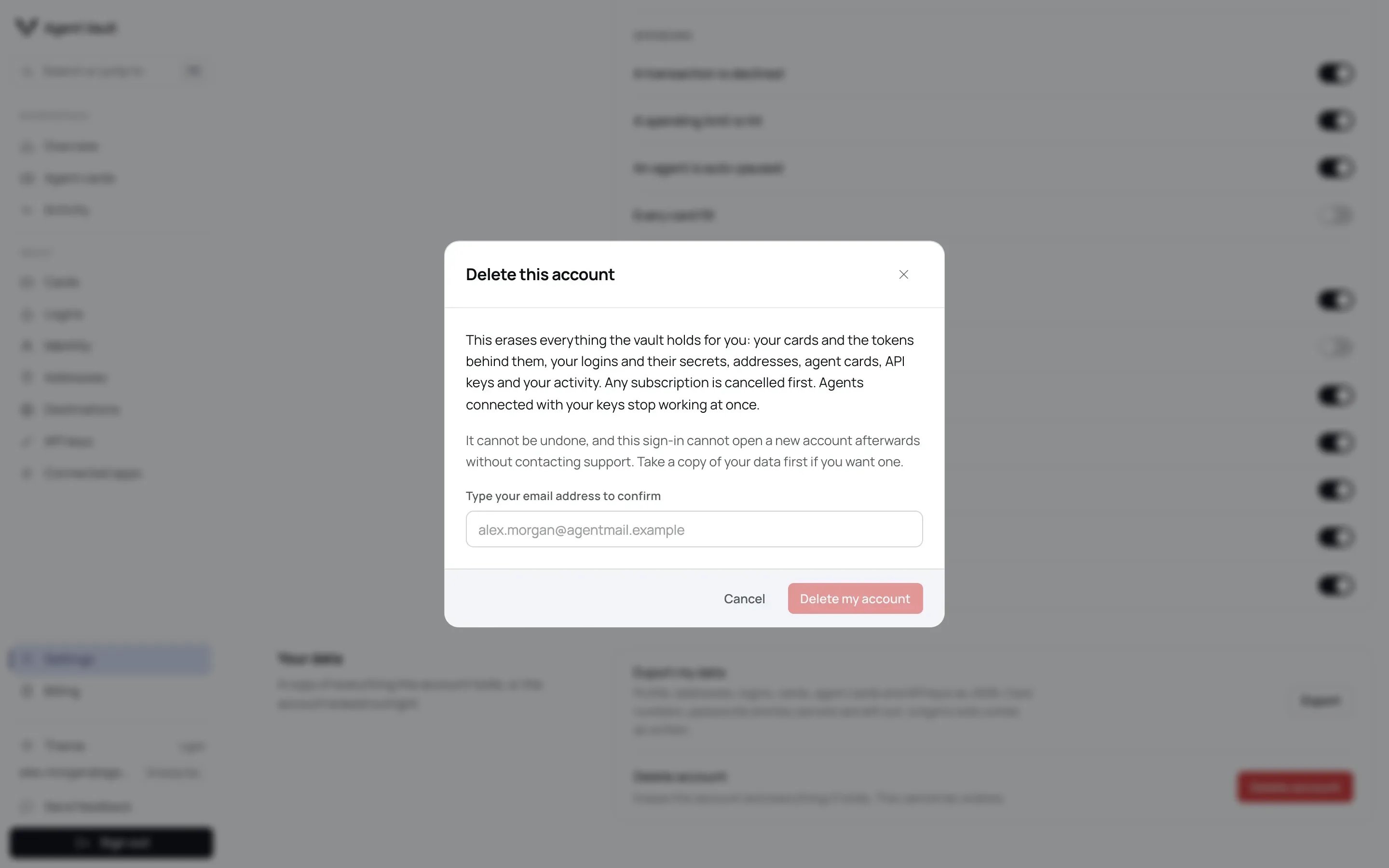
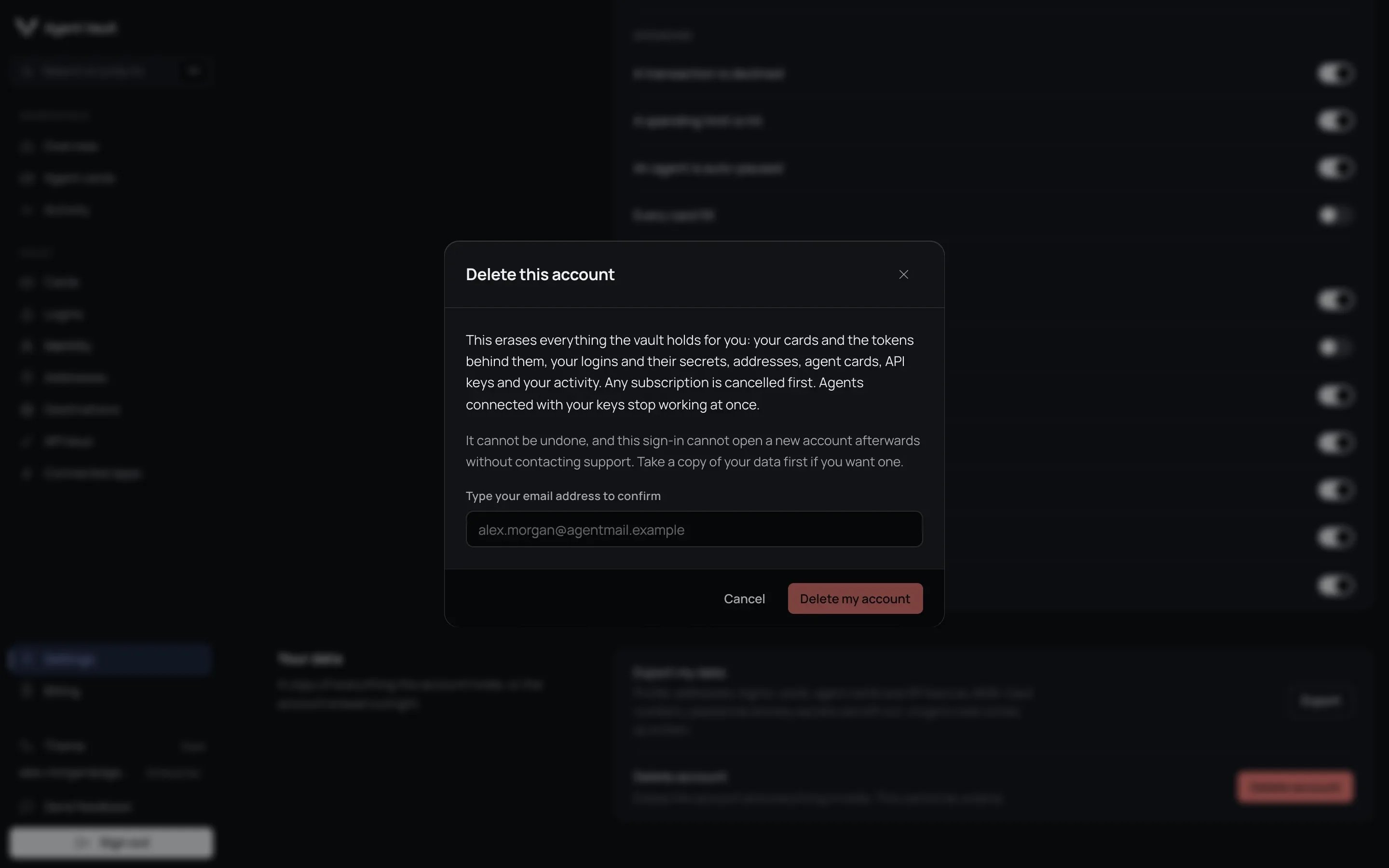
Deletion is permanent. Any paid subscription is cancelled, and agents using
your keys can fill nothing from that moment. Signing in again with the same
login does not create a new account: contact support to use it again.
On **Settings**, under **Your data**.
In the **Delete this account** dialog.
When it succeeds, you are signed out and the account is gone. Your history
is erased in the background: see
[What happens when you delete](#what-happens-when-you-delete).
If deletion is refused with `deletion_blocked`, the account and its data stay
and you stay signed in. Billing steps that already ran, such as cancelling your
subscription, are not undone: the message lists them. Retry in a few minutes.
Steps that already happened are skipped.
## What is stored
| What | Kept until |
| - | - |
| Your profile: email, name, phone number (as a country code and a number), plan, notification settings and your sign-in identifier. Also when the account was created, when you finished **Connect your first agent**, and whether **Pause all agents** is on and since when | You delete your account |
| Your account's housekeeping: how many login changes agents made in the last 24 hours, and how many pre-approved signups were used in the last 24 hours. Also the counters that give your next card and agent card their numbers, and (while a deletion is running) when it started | You delete your account |
| Billing, if you ever started a checkout. Your customer and subscription IDs at our payment processor, and the ID of any checkout still open. Your subscription history: each one's ID, plan, start, last change, and whether it ended or is paused. The time of the latest billing event and the ID of the last cancelled subscription. When a checkout last began creating your customer record there. Whether you used a **Launch offer** trial, or hold a place reserved for one while its checkout is open, and when an unused place is given back | You delete your account |
| Cards: a card vault reference and a fingerprint used to spot duplicates. Also the last four digits, brand, expiry, cardholder name, the name you gave the card (if any), the billing address it uses, and when it was added. See [Card storage](/security/card-storage#what-agent-vault-stores) | You remove the card, or delete your account. If the vault token cannot be revoked when you remove a card, a cleanup record is kept until the revocation succeeds or Agent Vault staff finish it manually. For what that record holds, see [What stays after deletion](#what-stays-after-deletion) |
| Logins: the label, name, site address and any other sign-in sites, note, username and email. Also when it was added, which API key added it (if an agent did) and whether its password was generated. The password and any authenticator secret are kept only encrypted | You remove them, or delete your account |
| Identities (label, first and last name, email, phone number) and addresses (label, street lines, city, state, postcode, country) | You remove them, or delete your account |
| Agent cards: the name, the funding card behind it, its mock card number and status. Its spending limits, merchant list and mode, whether it pauses itself at a limit, and its **Require confirmation above** amount. The webhook URL and the secret that signs its webhooks. Its spend totals (number of fills, total, this week, this month), and when it was created and last used | You remove them, or delete your account |
| [Destinations](/dashboard/destinations) (approved sites): each site, whether you added it or approved it at checkout, when, and the approval it came from | You remove them, or delete your account |
| API keys. The secret key itself is kept only as a scrambled form (hash). Kept in readable form: the first 12 characters of the key and its name, which cards and logins it may use, whether it may create logins and whether it fills a test card, and when it was created and last used. Also whether, when and why the key was revoked. A key is revoked by you, automatically after repeated attempts to use another account's tokens, or (for a hosted MCP connection's key) after the connection went unused. Also stored: a counter of those refused attempts, and a counter per rate limit, each with the time its window began | You delete your account. Revoked keys stay listed until then |
| [Pre-approved signups](/dashboard/logins#pre-approved-signups): each site, the email it registers with, when you added it, how often it was used and when it was last used | You remove them, or delete your account |
| Hosted MCP connections: for each app you signed in through the hosted MCP server, its client id, your sign-in subject, the consent id and the API key behind it. Also when it was created and last used, when you chose what it may use, and (if you revoked it or it was revoked for going unused) when it closed | You delete your account. A revoked connection, including one marked **Revoked: unused**, stays stored and listed until then |
| The short-lived credentials a hosted MCP connection uses. The secret itself is kept only as a scrambled form (hash). Stored with it in readable form: your account and the API key it acts for, when it was created and when it expires | Usually when its session closes or its connection is revoked. Removal at session close is best effort: if the hosted MCP server cannot reach Agent Vault at that moment, the credential stays stored until it expires (at most 75 minutes). It is removed within about an hour after that |
| Sessions: which API key opened each one, the merchant site, when it started and ended, and its status. Its outcome: whether an order confirmation was seen, the order total, how many fills were refused, and which kinds of detail were filled. Each session's events: when each step happened, what it was, and the site, kind of token, field, reason and detail it names. Receipts: the redacted screenshot of an order confirmation | **30 days** after the session started, then removed automatically |
| Live session records that count your concurrent sessions: the session and API key each belongs to, and when it expires | The session ends. One left behind by a crash is removed a few hours later |
| Card fill history. For each fill: the card and agent cards it counted against, the merchant site, the amount and currency (and its US dollar value), and when. Also the outcome (filled, refused, unknown or reversed) and why, the amount the agent declared and the amount submitted at checkout, and the API key and session | You delete your account |
| The Activity feed: each alert's type, title, text and details, the agent card or API key it is about, when it happened, and whether its email was sent | You delete your account |
| Webhook delivery logs: each delivery's URL, the full body sent and its signature, its status and number of attempts. Also the last response code and error, when it is retried next, and when it was created and last updated | You delete your account |
| Requests that wait on you. [Purchase approvals](/dashboard/approvals-and-notifications#purchase-approvals): the agent card, merchant site, amount (or that it was withheld), whether part of the order was paid another way, your **Require confirmation above** amount, why you were asked, related sites and the redacted checkout screenshot. [Security code requests](/dashboard/approvals-and-notifications#security-code-requests): the API key, the card's last four digits and the merchant site. [Verification handoffs](/dashboard/approvals-and-notifications#verification-handoffs): the API key, session and page, the kind of check, the site, and how it ended. [Agent signup requests](/dashboard/logins#approve-an-agent-signup): the API key and its name, the site, email and username, the password rules asked for, the login it created and any failure. Each request also keeps the one-time token from its link, its status, when it was created, when it expires, when it was answered, and (for approvals and signups) who answered | You delete your account. Answered and expired requests are kept too; there is no automatic removal. A settled or expired token can no longer be used |
| Feedback you send from the dashboard: whether it is a bug or a feature request, your message, the dashboard page you sent it from, its status and when you sent it | You delete your account |
| [Checkout recipes](/registry/contribute) your agents submit: the recipe and the site it is for, your note, whether you asked for a live check, its review status and screening verdicts, and when it was submitted and last updated | You delete your account. A recipe published to the registry stays after that, see [What happens when you delete](#what-happens-when-you-delete) |
| Rate limit counters (a count per minute for each API key and for the account, with when the minute began) | You delete your account |
| Devices set up for **Background alerts**: a push address and keys, a device label such as `Chrome on macOS`, when it was set up, when the browser's push service last accepted an alert for it, and how many alerts in a row have failed since | You turn **Background alerts** off on the device, the browser's push service reports it gone, or you delete your account. Failed alerts alone do not remove a device. If you already have 20 devices, setting up a new one removes the device you set up longest ago, without warning. See [Set up this device](/dashboard/approvals-and-notifications#set-up-this-device) |
Every record also carries its own internal ID and the time it was written.
## What is never stored
| Never stored | Why |
| - | - |
| Your card number, on Agent Vault's servers | Your browser sends it straight to the card vault provider. During a fill, the proxy holds the number in memory until the session closes, so it can type it once and remove it from anything your agent sees. It is never written to storage |
| Your card's security code (CVV) | Card industry rules (PCI DSS 3.3.1) forbid it, even for a code you type at checkout. During a fill, the proxy holds a code you enter in memory until the session closes, so it can type it once and remove it from anything your agent sees. It is never written to storage |
| Any filled value, in the session record | Only the kind of detail and the site are kept |
| A login password in readable form | It is encrypted, and never shown to you or an agent |
## The practice checkout
The practice checkout at `/demo-checkout` is a stand-in merchant, not part of
your account. When an agent checks out there, the proxy types your real name and
address into it, as it would on any merchant. What the page keeps depends on the
deployment you run it on.
Run the practice checkout with a key that has **Fill a test card instead of my
card** ticked, as the [quickstart](/get-started/quickstart) does. On a preview or
development deployment, use only details you are comfortable leaving on that
server.
| Deployment | What the practice checkout keeps | Kept until |
| - | - | - |
| The production Agent Vault service | Nothing. It answers the order and keeps no copy | Not applicable |
| A preview or development deployment | The latest submissions, held in the web server's memory, with every field the form sent: name, street, city, state, postcode, expiry, and the full card number and security code typed into the card fields | A later submission replaces them, or the server restarts |
| A preview or development deployment, for a run tagged for automated testing | Also a stored summary with no card number: name, street, city, state, postcode, expiry, the card's last four digits and whether a security code was entered | About a day, then removed automatically |
| A preview or development deployment, every submission | A line in the web server's log with the first name, last name, street and the card's last four digits | The log retention period of whoever hosts that web server. Agent Vault sets no shorter limit, and nothing removes the line early |
These records are not linked to your account. Deleting your account does not
remove them, and the export does not include them.
## Export your data
In the sidebar, under **Account**, click **Settings**.
Under **Your data**, next to **Export my data**.
A JSON file downloads. It contains:
* your profile and settings;
* identities, addresses, logins, cards, agent cards and API keys;
* destinations (`authorizedDestinations`);
* pre-approved signup sites and emails (`signupPreapprovals`);
* hosted MCP connections (`mcpConnections`): client, subject, API key and
consent IDs, and when each was created, last used and had its access chosen.
The time a connection closed is not included; its API key's `revoked` and
`revokedAt` fields show whether and when that key was revoked.
Left out:
* Passwords, because the file may be shared. Each login shows only
`hasPassword`.
* Card numbers. Agent Vault does not hold them; the card vault provider does.
* API key secrets and the short-lived MCP credentials. Only a scrambled form
(hash) is kept, so they cannot be recovered.
For any other request about your data, contact [team@self.xyz](mailto:team@self.xyz).
## Delete your account
Export a copy first if you want one.
Deletion is permanent. Any paid subscription is cancelled, and agents using
your keys can fill nothing from that moment. Signing in again with the same
login does not create a new account: contact support to use it again.
On **Settings**, under **Your data**.
In the **Delete this account** dialog.
When it succeeds, you are signed out and the account is gone. Your history
is erased in the background: see
[What happens when you delete](#what-happens-when-you-delete).
If deletion is refused with `deletion_blocked`, the account and its data stay
and you stay signed in. Billing steps that already ran, such as cancelling your
subscription, are not undone: the message lists them. Retry in a few minutes.
Steps that already happened are skipped.
 Deleting your account is the self-service way to have your data erased. You can
also ask by email, at [team@self.xyz](mailto:team@self.xyz), which is also the address for any other
request about your rights over your data. A few records stay: see
[What stays after deletion](#what-stays-after-deletion).
## What happens when you delete
Deletion happens in two stages. Everything that can still act for you stops at
once. Your history is then erased in the background.
| Data | On deletion |
| - | - |
| Cards, logins, identities, addresses, agent cards | Deleted at once, so no agent can use them. Each card's vault token is then revoked, with retries if the vault is unavailable. A token that another card record still uses is not revoked; see [Duplicate cards](/security/card-storage#duplicate-cards) |
| API keys and hosted MCP connections | Stop working at once. An agent session already open closes within about a minute. The key and connection records are deleted in the background |
| Approvals, security code, verification and signup requests, pending or settled | Pending links stop working at once, and pending requests are deleted at once. Every other request, including each one already answered or expired, is deleted in the background |
| Devices set up for **Background alerts** | Deleted at once, so no alert reaches your phone |
| Destinations (approved sites) and pre-approved signups | Deleted in the background. No agent can use them, because your keys no longer work |
| Card fill history, Activity feed, feedback, rate limit counters | Deleted in the background |
| Webhook delivery logs | The most recent are deleted at once, the rest in the background |
| Sessions, events and receipts | Deleted in the background, without waiting for the 30 days |
| Checkout recipes you contributed that reached the public registry | Kept, but no longer linked to you. The note you wrote for the maintainer is removed, unless a maintainer already published it as the recipe's verification evidence |
| Checkout recipes you contributed that were never published (still pending, waiting for a maintainer, or rejected) | Deleted in the background |
| Your subscription | Cancelled, and your customer record at our payment processor deleted. Invoices, charges and payment history stay with the payment processor. See [Billing records at our payment processor](#billing-records-at-our-payment-processor) |
| Your sign-in identifier | Kept. See [Your sign-in identifier](#your-sign-in-identifier) |
| Practice checkout submissions on a preview or development deployment, including the web server's log line for each | Not removed. They are not linked to your account. See [The practice checkout](#the-practice-checkout) |
The background erasure runs in small batches until your history is gone, so a
long history takes longer to clear. An interrupted erasure restarts
automatically. You are signed out before it finishes. Records still waiting to
be erased cannot be used by any agent in the meantime. While it runs, Agent Vault keeps a
progress record with your account's internal ID, when you asked and which step
it is on. That record is removed when the erasure finishes.
### What stays after deletion
After deletion, Agent Vault keeps your sign-in identifier. If you ever paid for
a plan, our payment processor keeps your billing records. Recipes you
contributed that reached the public registry also stay, no longer linked to you.
If a cleanup step fails, Agent Vault also keeps one or both of these records
until the cleanup is done:
| Record | What it holds | Kept until |
| - | - | - |
| A card vault token that could not be revoked | The vault token reference, your account's internal ID, whether you removed the card or deleted the account, the last error, how many retries ran and when the first failure happened | The revocation succeeds. It is retried daily with no limit. If it failed in a way no retry can fix, the record stays until Agent Vault staff complete the revocation manually |
| A billing cleanup that could not finish | Your customer or checkout session ID at our payment processor, your account's internal ID, what the cleanup had to do, the last error, how many retries ran, when retries first ran out and when it finished | About a week after the cleanup succeeds. If daily retries run out, it stays until Agent Vault staff finish the cleanup manually |
#### Your sign-in identifier
Agent Vault keeps your sign-in identifier and the time the account was
deleted. The identifier is the ID your sign-in provider gives your login, not
your email address. It holds none of your data and is not linked to anything
that was erased.
It exists so that signing in again with the same login cannot silently create a
new, empty account. It has no expiry. It is removed only if you contact support
and ask to use that login again.
#### Billing records at our payment processor
This applies only if you ever paid for a plan. Deletion cancels your
subscription and deletes your customer record at our payment processor, which removes your
email address and saved payment methods there. It does not delete your
invoices, charges or payment history. Tax and accounting law requires the
payment processor to keep those, which is why an erasure request does not
remove them.
Agent Vault moves no money, so the merchant and your card issuer hold the real
financial record. Once the account is gone, the history is no longer needed to
enforce spending limits, and it cannot serve as dispute evidence.
A checkout recipe may already be published in the public registry for other
agents to use. The recipe stays, and its owner is replaced with a marker no
account can hold. Your note to the maintainer is removed, unless a maintainer
already published it as the recipe's verification evidence. A submission that
never reached the registry is deleted instead, because nothing else depends on
it.
## For developers
| Item | Detail |
| - | - |
| Read your token catalog | `GET /v1/tokens` with an API key returns it in mock-token form. See [HTTP API](/reference/http-api) |
| Analytics and error reports | Scrubbed before data leaves Agent Vault. Session replay is turned off in the dashboard |
**Next:** [Security model](/security/model) to see how stored data is protected.
This documentation is built and hosted on [Mintlify](https://mintlify.com), a developer documentation platform.
Deleting your account is the self-service way to have your data erased. You can
also ask by email, at [team@self.xyz](mailto:team@self.xyz), which is also the address for any other
request about your rights over your data. A few records stay: see
[What stays after deletion](#what-stays-after-deletion).
## What happens when you delete
Deletion happens in two stages. Everything that can still act for you stops at
once. Your history is then erased in the background.
| Data | On deletion |
| - | - |
| Cards, logins, identities, addresses, agent cards | Deleted at once, so no agent can use them. Each card's vault token is then revoked, with retries if the vault is unavailable. A token that another card record still uses is not revoked; see [Duplicate cards](/security/card-storage#duplicate-cards) |
| API keys and hosted MCP connections | Stop working at once. An agent session already open closes within about a minute. The key and connection records are deleted in the background |
| Approvals, security code, verification and signup requests, pending or settled | Pending links stop working at once, and pending requests are deleted at once. Every other request, including each one already answered or expired, is deleted in the background |
| Devices set up for **Background alerts** | Deleted at once, so no alert reaches your phone |
| Destinations (approved sites) and pre-approved signups | Deleted in the background. No agent can use them, because your keys no longer work |
| Card fill history, Activity feed, feedback, rate limit counters | Deleted in the background |
| Webhook delivery logs | The most recent are deleted at once, the rest in the background |
| Sessions, events and receipts | Deleted in the background, without waiting for the 30 days |
| Checkout recipes you contributed that reached the public registry | Kept, but no longer linked to you. The note you wrote for the maintainer is removed, unless a maintainer already published it as the recipe's verification evidence |
| Checkout recipes you contributed that were never published (still pending, waiting for a maintainer, or rejected) | Deleted in the background |
| Your subscription | Cancelled, and your customer record at our payment processor deleted. Invoices, charges and payment history stay with the payment processor. See [Billing records at our payment processor](#billing-records-at-our-payment-processor) |
| Your sign-in identifier | Kept. See [Your sign-in identifier](#your-sign-in-identifier) |
| Practice checkout submissions on a preview or development deployment, including the web server's log line for each | Not removed. They are not linked to your account. See [The practice checkout](#the-practice-checkout) |
The background erasure runs in small batches until your history is gone, so a
long history takes longer to clear. An interrupted erasure restarts
automatically. You are signed out before it finishes. Records still waiting to
be erased cannot be used by any agent in the meantime. While it runs, Agent Vault keeps a
progress record with your account's internal ID, when you asked and which step
it is on. That record is removed when the erasure finishes.
### What stays after deletion
After deletion, Agent Vault keeps your sign-in identifier. If you ever paid for
a plan, our payment processor keeps your billing records. Recipes you
contributed that reached the public registry also stay, no longer linked to you.
If a cleanup step fails, Agent Vault also keeps one or both of these records
until the cleanup is done:
| Record | What it holds | Kept until |
| - | - | - |
| A card vault token that could not be revoked | The vault token reference, your account's internal ID, whether you removed the card or deleted the account, the last error, how many retries ran and when the first failure happened | The revocation succeeds. It is retried daily with no limit. If it failed in a way no retry can fix, the record stays until Agent Vault staff complete the revocation manually |
| A billing cleanup that could not finish | Your customer or checkout session ID at our payment processor, your account's internal ID, what the cleanup had to do, the last error, how many retries ran, when retries first ran out and when it finished | About a week after the cleanup succeeds. If daily retries run out, it stays until Agent Vault staff finish the cleanup manually |
#### Your sign-in identifier
Agent Vault keeps your sign-in identifier and the time the account was
deleted. The identifier is the ID your sign-in provider gives your login, not
your email address. It holds none of your data and is not linked to anything
that was erased.
It exists so that signing in again with the same login cannot silently create a
new, empty account. It has no expiry. It is removed only if you contact support
and ask to use that login again.
#### Billing records at our payment processor
This applies only if you ever paid for a plan. Deletion cancels your
subscription and deletes your customer record at our payment processor, which removes your
email address and saved payment methods there. It does not delete your
invoices, charges or payment history. Tax and accounting law requires the
payment processor to keep those, which is why an erasure request does not
remove them.
Agent Vault moves no money, so the merchant and your card issuer hold the real
financial record. Once the account is gone, the history is no longer needed to
enforce spending limits, and it cannot serve as dispute evidence.
A checkout recipe may already be published in the public registry for other
agents to use. The recipe stays, and its owner is replaced with a marker no
account can hold. Your note to the maintainer is removed, unless a maintainer
already published it as the recipe's verification evidence. A submission that
never reached the registry is deleted instead, because nothing else depends on
it.
## For developers
| Item | Detail |
| - | - |
| Read your token catalog | `GET /v1/tokens` with an API key returns it in mock-token form. See [HTTP API](/reference/http-api) |
| Analytics and error reports | Scrubbed before data leaves Agent Vault. Session replay is turned off in the dashboard |
**Next:** [Security model](/security/model) to see how stored data is protected.
This documentation is built and hosted on [Mintlify](https://mintlify.com), a developer documentation platform.