> ## Documentation Index
> Fetch the complete documentation index at: https://docs.agentvault.io/llms.txt
> Use this file to discover all available pages before exploring further.
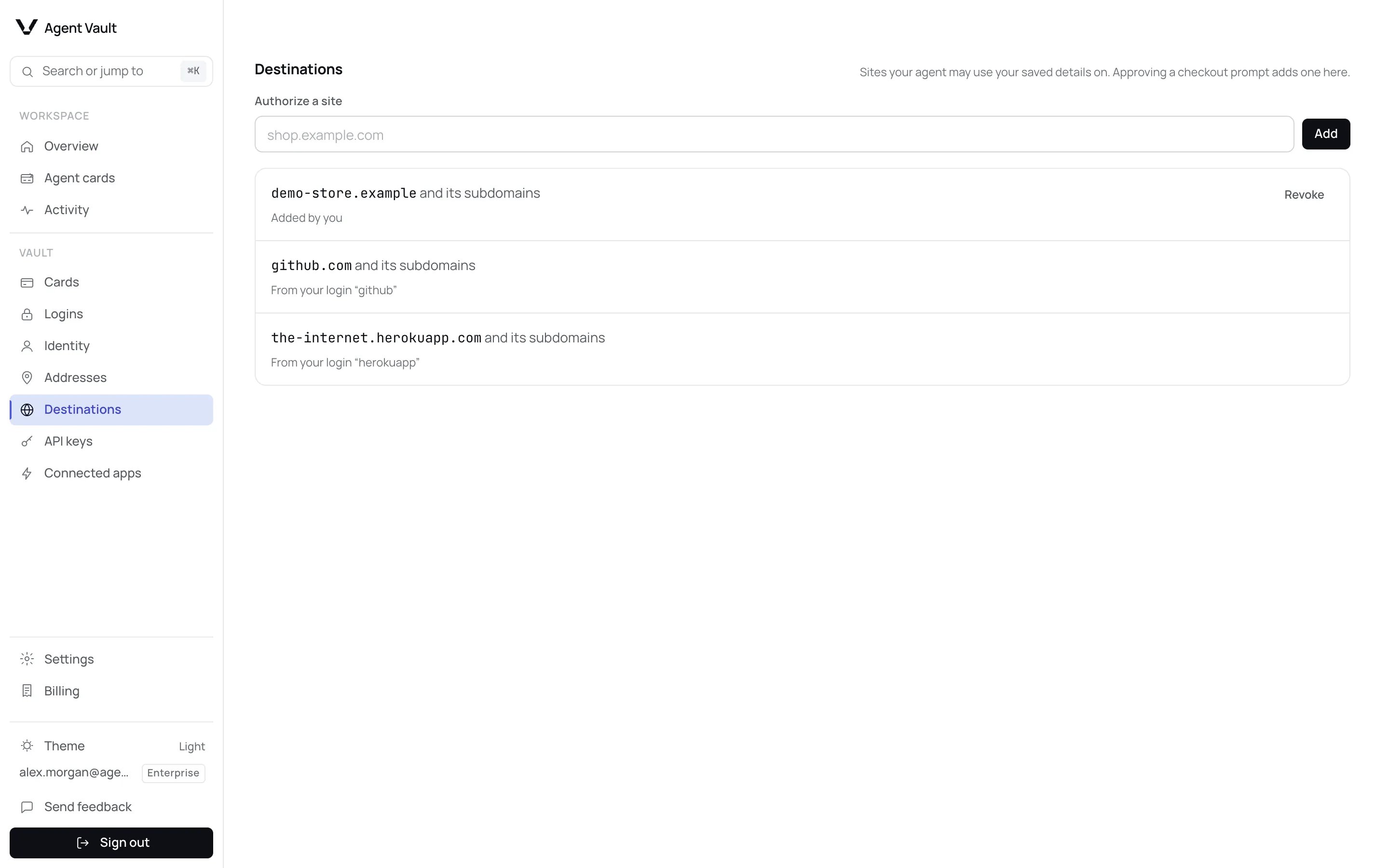
# Destinations
> Choose the sites where your agent may use your saved identity, addresses and card details.
Choose the sites where your agent may use your saved card, security code (CVV),
identity and addresses. Approving or revoking a site takes under a minute.
 ## What a destination is
A destination is a site, such as `shop.example.com`, that may receive your saved
details. Your agent can fill your card, security code, identity or an address
only on a destination. On any other site, the fill pauses and asks you first.
A site is a destination when one of these applies:
| Why the site is allowed | Shown on the page as |
| - | - |
| You approved it when your agent first tried it | **Approved at checkout** |
| You added it on this page | **Added by you** |
| It is the **Website** or one of the **Other sign-in sites** of a [login](/dashboard/logins) | **From your login** and the login's name |
| It is listed on an **active** agent card in **Allowlist only** mode | **From agent card** and the card's name |
An approved site also covers its subdomains, and the page says **and its
subdomains**: `shop.example.com` covers `checkout.shop.example.com`. Shared
hosting domains such as `github.io`, and a login's **Other sign-in sites**, cover
only the exact site.
## Approve a new site
The first time your agent tries to use your saved details on a site that is not
a destination, the fill pauses and a banner on the dashboard asks you. You are
also alerted on each channel you turned on, while **A purchase needs my
approval** is on. See [Notification settings](/dashboard/approvals-and-notifications#notification-settings).
## What a destination is
A destination is a site, such as `shop.example.com`, that may receive your saved
details. Your agent can fill your card, security code, identity or an address
only on a destination. On any other site, the fill pauses and asks you first.
A site is a destination when one of these applies:
| Why the site is allowed | Shown on the page as |
| - | - |
| You approved it when your agent first tried it | **Approved at checkout** |
| You added it on this page | **Added by you** |
| It is the **Website** or one of the **Other sign-in sites** of a [login](/dashboard/logins) | **From your login** and the login's name |
| It is listed on an **active** agent card in **Allowlist only** mode | **From agent card** and the card's name |
An approved site also covers its subdomains, and the page says **and its
subdomains**: `shop.example.com` covers `checkout.shop.example.com`. Shared
hosting domains such as `github.io`, and a login's **Other sign-in sites**, cover
only the exact site.
## Approve a new site
The first time your agent tries to use your saved details on a site that is not
a destination, the fill pauses and a banner on the dashboard asks you. You are
also alerted on each channel you turned on, while **A purchase needs my
approval** is on. See [Notification settings](/dashboard/approvals-and-notifications#notification-settings).

 The banner reads **A new site is waiting for your approval** and names the
site. The emailed link, if you get one, opens the same question on the
**Approval needed** page.
If you did not send your agent there, or the name looks slightly off, deny it.
You have about 15 minutes.
After **Approve**, the paused fill continues and the site appears on
**Destinations** as **Approved at checkout**. Your agent can now use your saved
details there without asking again.
### When one checkout runs on several sites
Some checkouts span more than one site, for example a shop whose payment step
runs on a separate domain. When the [checkout recipe registry](/registry/overview)
knows this, the request says **The same checkout also runs on** and lists the
other sites by name.
* **Approve** authorizes every site in that list, not only the one your agent
tried. Each appears on **Destinations** as **Approved at checkout**. Any other
fill already waiting on one of those sites continues without a second
request.
* **Deny** leaves all of them unauthorized.
Read the whole list before you approve.
The list appears only when the site's recipe has been checked by a person: it
came from the reviewed registry, or a maintainer marked it
[`verified`](/registry/statuses#verified). It does not appear when:
* the recipe is a contribution that passed only automated screening and no
maintainer has verified it yet;
* the site's recipes list more than six other sites to authorize.
The request then names only the site your agent tried. A later fill on one of
the other sites asks you again.
One approval covers every kind of saved detail on that site. A checkout that
fills your name, an address and a card asks you once.
## Authorize a site in advance
In the sidebar, under **Vault**, click **Destinations**.
Type a full site address, such as `shop.example.com`. A pasted link is
trimmed to the site. A bare ending such as `com` is refused.
If the site's checkout also runs on other sites, a checkbox appears under
the field: **Also authorize the other sites this site's checkout runs on:**
followed by each site by name. It is **ticked by default**. Read the list.
Clear the checkbox to authorize only the site you typed.
A message confirms the site is authorized. With the checkbox ticked, it also
names the other sites, for example
`shop.example.com authorized, with pay.example.net.`
Your agent can now use your saved details on those sites without asking.
With the checkbox ticked, **Add** authorizes every site in the list, not only
the one you typed. Each appears on **Destinations** as **Added by you**, with
its own **Revoke** button. The list follows the same rules as the one in a
new-site request:
* It appears only when the site's recipe has been checked by a person: it came
from the reviewed registry, or a maintainer marked it
[`verified`](/registry/statuses#verified).
* It does not appear when the site's recipes list more than six other sites to
authorize.
Without a list, **Add** authorizes only the site you typed. If the list changes
before your click, nothing is authorized and the form says **The other sites for
this site changed while you were looking. Review the list and add again.**
## Revoke a site
Click **Revoke** on the site's row. The message **Approval revoked.** confirms
it, and your saved details stop filling there straight away.
**Revoke** appears only on sites you approved or added. To remove a site that
comes from a login or an agent card, click the reason under the site to open that
login or agent card, then edit it. If another setting still allows a site you
revoked, the page says so, for example **Still authorized by your login**
followed by its name.
## What happens when…
| When | What happens |
| - | - |
| You approve | The fill continues and the site is added |
| You deny | Nothing is filled. Later fills on that site in the same session are refused without asking you again |
| You do not answer within about 15 minutes | The same as deny. The site stays unauthorized |
| You delete or edit the login a site came from | The site stops counting, unless another reason still applies |
| An agent card is paused, reaches a limit, or leaves **Allowlist only** | Its sites stop counting, unless another reason still applies |
**Pause all agents** on [Overview](/dashboard/overview#stop-every-agent-at-once)
stops every saved detail from filling on every site, destination or not.
## What your agent gets
If you deny the request or let it expire, nothing is typed. The agent gets
`destination_unauthorized` and is told to stop and say which site it was on.
Once you approve or add the site, it can retry in the same session.
In [Activity](/dashboard/activity), the refused fill normally shows as **Site not
authorized**. Recording is best effort, so the error code your agent received is
the proof.
## Destinations and agent card merchant rules
Both decide where details may go, but they answer different questions.
| | Destinations | [Merchant restrictions](/dashboard/agent-cards#merchant-restrictions) |
| - | - | - |
| Covers | Your whole account: card, security code, identity and addresses | Card fills controlled by one agent card |
| A site not on the list | Pauses and asks you | Refused, without asking |
| Agent gets | `destination_unauthorized` | `merchant_blocked` |
| Plan | Every plan | Choosing or editing **Allowlist only** needs Enterprise. One set before a downgrade stays enforced |
A card fill must pass both. The agent card's rule is checked first, so a site it
blocks reports `merchant_blocked` even if it is also not a destination. Sites on
an active **Allowlist only** agent card count as destinations, so you are not
asked about them twice.
## For developers
| Item | Value |
| - | - |
| Error code | `destination_unauthorized`. See [Error codes](/sdk/error-codes) |
| Approval reason | `new_destination` |
| Notification event | `approval_required`, the same switch as purchase approvals |
**Next:** [Approvals and notifications](/dashboard/approvals-and-notifications) to make sure requests reach you before they expire.
This documentation is built and hosted on [Mintlify](https://mintlify.com), a developer documentation platform.
The banner reads **A new site is waiting for your approval** and names the
site. The emailed link, if you get one, opens the same question on the
**Approval needed** page.
If you did not send your agent there, or the name looks slightly off, deny it.
You have about 15 minutes.
After **Approve**, the paused fill continues and the site appears on
**Destinations** as **Approved at checkout**. Your agent can now use your saved
details there without asking again.
### When one checkout runs on several sites
Some checkouts span more than one site, for example a shop whose payment step
runs on a separate domain. When the [checkout recipe registry](/registry/overview)
knows this, the request says **The same checkout also runs on** and lists the
other sites by name.
* **Approve** authorizes every site in that list, not only the one your agent
tried. Each appears on **Destinations** as **Approved at checkout**. Any other
fill already waiting on one of those sites continues without a second
request.
* **Deny** leaves all of them unauthorized.
Read the whole list before you approve.
The list appears only when the site's recipe has been checked by a person: it
came from the reviewed registry, or a maintainer marked it
[`verified`](/registry/statuses#verified). It does not appear when:
* the recipe is a contribution that passed only automated screening and no
maintainer has verified it yet;
* the site's recipes list more than six other sites to authorize.
The request then names only the site your agent tried. A later fill on one of
the other sites asks you again.
One approval covers every kind of saved detail on that site. A checkout that
fills your name, an address and a card asks you once.
## Authorize a site in advance
In the sidebar, under **Vault**, click **Destinations**.
Type a full site address, such as `shop.example.com`. A pasted link is
trimmed to the site. A bare ending such as `com` is refused.
If the site's checkout also runs on other sites, a checkbox appears under
the field: **Also authorize the other sites this site's checkout runs on:**
followed by each site by name. It is **ticked by default**. Read the list.
Clear the checkbox to authorize only the site you typed.
A message confirms the site is authorized. With the checkbox ticked, it also
names the other sites, for example
`shop.example.com authorized, with pay.example.net.`
Your agent can now use your saved details on those sites without asking.
With the checkbox ticked, **Add** authorizes every site in the list, not only
the one you typed. Each appears on **Destinations** as **Added by you**, with
its own **Revoke** button. The list follows the same rules as the one in a
new-site request:
* It appears only when the site's recipe has been checked by a person: it came
from the reviewed registry, or a maintainer marked it
[`verified`](/registry/statuses#verified).
* It does not appear when the site's recipes list more than six other sites to
authorize.
Without a list, **Add** authorizes only the site you typed. If the list changes
before your click, nothing is authorized and the form says **The other sites for
this site changed while you were looking. Review the list and add again.**
## Revoke a site
Click **Revoke** on the site's row. The message **Approval revoked.** confirms
it, and your saved details stop filling there straight away.
**Revoke** appears only on sites you approved or added. To remove a site that
comes from a login or an agent card, click the reason under the site to open that
login or agent card, then edit it. If another setting still allows a site you
revoked, the page says so, for example **Still authorized by your login**
followed by its name.
## What happens when…
| When | What happens |
| - | - |
| You approve | The fill continues and the site is added |
| You deny | Nothing is filled. Later fills on that site in the same session are refused without asking you again |
| You do not answer within about 15 minutes | The same as deny. The site stays unauthorized |
| You delete or edit the login a site came from | The site stops counting, unless another reason still applies |
| An agent card is paused, reaches a limit, or leaves **Allowlist only** | Its sites stop counting, unless another reason still applies |
**Pause all agents** on [Overview](/dashboard/overview#stop-every-agent-at-once)
stops every saved detail from filling on every site, destination or not.
## What your agent gets
If you deny the request or let it expire, nothing is typed. The agent gets
`destination_unauthorized` and is told to stop and say which site it was on.
Once you approve or add the site, it can retry in the same session.
In [Activity](/dashboard/activity), the refused fill normally shows as **Site not
authorized**. Recording is best effort, so the error code your agent received is
the proof.
## Destinations and agent card merchant rules
Both decide where details may go, but they answer different questions.
| | Destinations | [Merchant restrictions](/dashboard/agent-cards#merchant-restrictions) |
| - | - | - |
| Covers | Your whole account: card, security code, identity and addresses | Card fills controlled by one agent card |
| A site not on the list | Pauses and asks you | Refused, without asking |
| Agent gets | `destination_unauthorized` | `merchant_blocked` |
| Plan | Every plan | Choosing or editing **Allowlist only** needs Enterprise. One set before a downgrade stays enforced |
A card fill must pass both. The agent card's rule is checked first, so a site it
blocks reports `merchant_blocked` even if it is also not a destination. Sites on
an active **Allowlist only** agent card count as destinations, so you are not
asked about them twice.
## For developers
| Item | Value |
| - | - |
| Error code | `destination_unauthorized`. See [Error codes](/sdk/error-codes) |
| Approval reason | `new_destination` |
| Notification event | `approval_required`, the same switch as purchase approvals |
**Next:** [Approvals and notifications](/dashboard/approvals-and-notifications) to make sure requests reach you before they expire.
This documentation is built and hosted on [Mintlify](https://mintlify.com), a developer documentation platform.