> ## Documentation Index
> Fetch the complete documentation index at: https://docs.agentvault.io/llms.txt
> Use this file to discover all available pages before exploring further.
# Core concepts
> The nine terms the rest of the documentation builds on, each in a few sentences.
Learn the nine terms the rest of these docs use. Each takes under a minute.
| Concept | In one sentence |
| - | - |
| [Mock token](#mock-token) | A placeholder the agent uses instead of your real card number, address or password. |
| [Token catalog](#token-catalog) | The list of tokens an agent may use, with harmless details to choose between them. |
| [API key](#api-key) | How a self-run agent proves it acts for your account, and what it may reach. A hosted agent signs in with OAuth instead. |
| [Proxy session](#proxy-session) | The browser the agent drives, which runs inside Agent Vault. |
| [Fill-time substitution](#fill-time-substitution) | The moment a token becomes the real value, and every rule is checked. |
| [URL locking](#url-locking) | A credential only works on the site it belongs to. |
| [Funding card and agent card](#funding-card-and-agent-card) | Your real card, and the rules on how agents may use it. |
| [Challenge and handoff](#challenge-and-handoff) | Steps only you can complete, passed to you on the live page. |
| [Checkout recipe](#checkout-recipe) | A shared description of how a store's checkout works. |
 ## Mock token
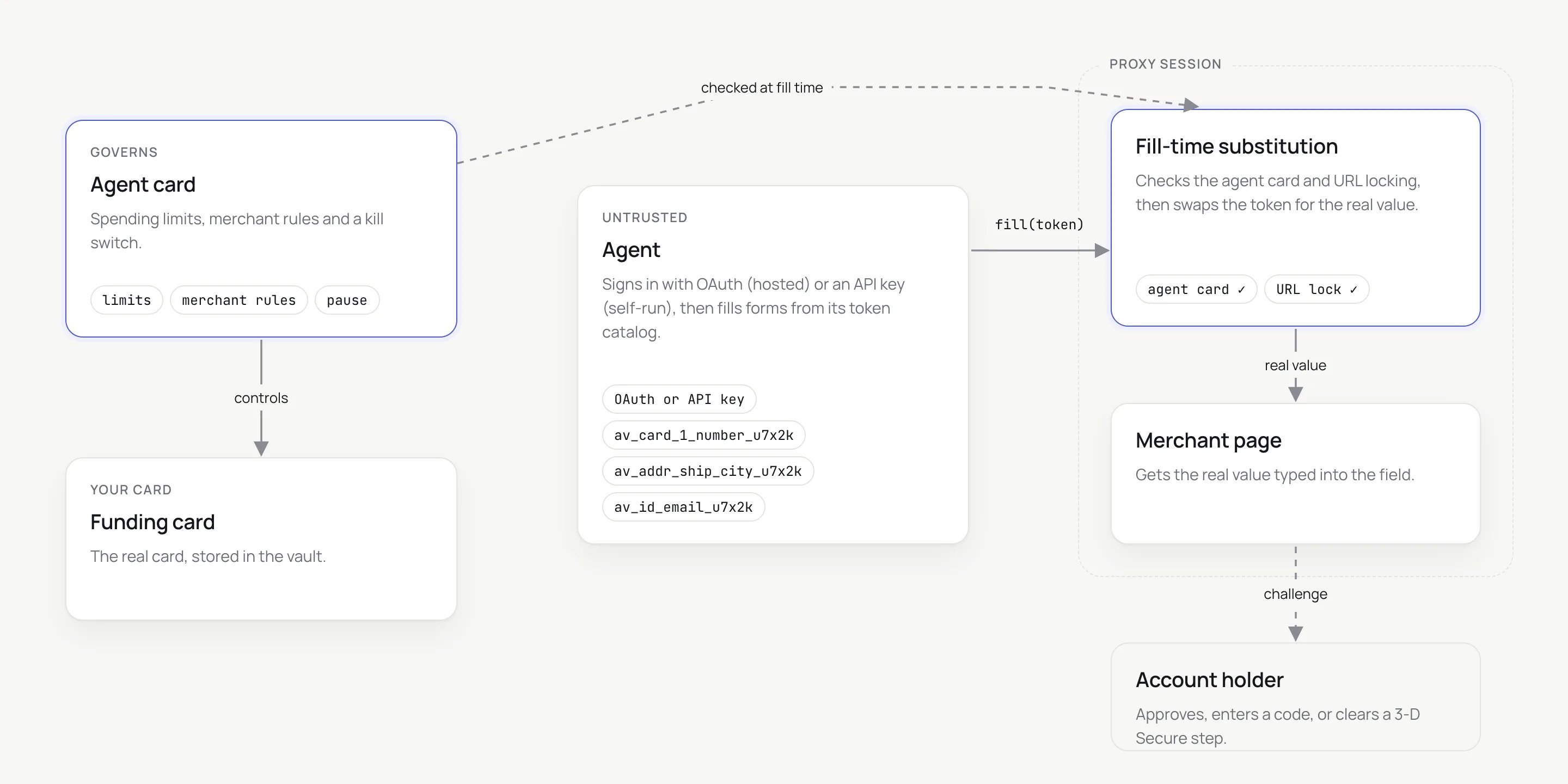
A mock token stands in for a real value, such as `av_card_1_number_u7x2k` or
`av_login_github_password_u7x2k`. Typed anywhere outside the proxy, it is a
literal string: the checkout fails and nothing real is exposed. Tokens do not
expire, and changing a password does not change its token. Full format:
[Token grammar](/reference/token-grammar).
## Token catalog
The catalog lists every token an API key may use, plus non-secret details for
choosing between them: card brand, last four digits, expiry, and the sites each
card or login applies to. Everything sensitive in it is a token, so it is safe to
give to any agent. Fetch it with `get_token_catalog`, `listTokens()` or
`GET /v1/tokens`. Full shape: [Token catalog](/reference/token-catalog).
## API key
An agent that runs the MCP server itself, or uses the SDK, acts for your account
with an API key. Keys start with `av_`, are shown once, and can be limited to
specific cards and logins, so one agent can get less than another. A key that
tries another account's tokens three times in five minutes is revoked
automatically. See [API keys](/dashboard/api-keys).
An agent on the hosted MCP server has no API key. It signs in with OAuth, and
that sign-in becomes a connection you limit the same way, on **Connected apps**.
See [Connected apps](/dashboard/api-keys#connected-apps).
## Proxy session
The agent sends commands such as "open this page" or "fill this field" to the
Agent Vault proxy over a WebSocket. The browser, its tabs and cookies belong to
one proxy session, which ends after **15 minutes idle** or **60 minutes in
total**. After that the agent starts a new session with a fresh browser. See
[Sessions and timeouts](/sdk/sessions-and-timeouts).
## Fill-time substitution
A token becomes a real value only inside the proxy's browser, as it is typed into
the field. Every rule is checked at that moment: the site, the account, the key's
scope, your merchant rules, whether the site is an authorized destination, your
limits and your approval threshold. If any check fails, nothing is typed and the
agent gets an error code. A failure after typing starts, such as
`fill_rejected`, can leave part or all of the value on the page. The full
decision is on [How it works](/get-started/how-it-works#what-is-checked-at-the-moment-of-a-fill).
## URL locking
A **login** works only on its registered website, its subdomains, and any extra
websites you added, so an agent cannot be tricked into typing your password on a
fake site. A **card** works wherever its agent cards allow, which is any site
unless you set merchant rules, and only on an authorized
[destination](/dashboard/destinations). See [URL locking](/security/url-locking).
## Funding card and agent card
The **funding card** is the real card you added and the one the merchant charges.
An **agent card** is a set of rules on top of it: spending limits, merchant rules,
an approval threshold, a webhook and a pause switch. It has no card number. A
funding card with no agent card has no spending caps or merchant rules. Only
your plan's [payment quota](/reference/limits#plan-limits) still counts its fills. Your first card gets a starter
one automatically, but any card you add after it does not: click **Add limits**
on it. See [Agent cards](/dashboard/agent-cards).
The fill goes ahead if at least one **active** agent card on that funding card
allows the merchant. Then the limits of every agent card on it that allows the
merchant and is active or stopped at its limit apply. One you paused yourself
lends no limits.
## Challenge and handoff
A **challenge** is a step meant for a person: a 3-D Secure bank prompt, a
one-time code sent to you, or a CAPTCHA. The proxy detects these and never solves
them. A **handoff** shows you the agent's live page so you complete the step,
while the agent's page commands are blocked. One exception: an authenticator-app
step on a login with a stored TOTP secret, which the agent fills with that login's
`totp` token. See [Handle challenges](/guides/challenges).
## Checkout recipe
A recipe is a public JSON description of how a platform or store's checkout
works: how to recognize it, where the card goes, and known dead ends. Each carries
a status, from `verified` (a real purchase, proven by a receipt) to `dead-end` (no
unattended checkout is possible, with the reason). See
[Checkout recipe registry](/registry/overview).
**Next:** [How it works](/get-started/how-it-works) to follow one checkout from start to finish.
This documentation is built and hosted on [Mintlify](https://mintlify.com), a developer documentation platform.
## Mock token
A mock token stands in for a real value, such as `av_card_1_number_u7x2k` or
`av_login_github_password_u7x2k`. Typed anywhere outside the proxy, it is a
literal string: the checkout fails and nothing real is exposed. Tokens do not
expire, and changing a password does not change its token. Full format:
[Token grammar](/reference/token-grammar).
## Token catalog
The catalog lists every token an API key may use, plus non-secret details for
choosing between them: card brand, last four digits, expiry, and the sites each
card or login applies to. Everything sensitive in it is a token, so it is safe to
give to any agent. Fetch it with `get_token_catalog`, `listTokens()` or
`GET /v1/tokens`. Full shape: [Token catalog](/reference/token-catalog).
## API key
An agent that runs the MCP server itself, or uses the SDK, acts for your account
with an API key. Keys start with `av_`, are shown once, and can be limited to
specific cards and logins, so one agent can get less than another. A key that
tries another account's tokens three times in five minutes is revoked
automatically. See [API keys](/dashboard/api-keys).
An agent on the hosted MCP server has no API key. It signs in with OAuth, and
that sign-in becomes a connection you limit the same way, on **Connected apps**.
See [Connected apps](/dashboard/api-keys#connected-apps).
## Proxy session
The agent sends commands such as "open this page" or "fill this field" to the
Agent Vault proxy over a WebSocket. The browser, its tabs and cookies belong to
one proxy session, which ends after **15 minutes idle** or **60 minutes in
total**. After that the agent starts a new session with a fresh browser. See
[Sessions and timeouts](/sdk/sessions-and-timeouts).
## Fill-time substitution
A token becomes a real value only inside the proxy's browser, as it is typed into
the field. Every rule is checked at that moment: the site, the account, the key's
scope, your merchant rules, whether the site is an authorized destination, your
limits and your approval threshold. If any check fails, nothing is typed and the
agent gets an error code. A failure after typing starts, such as
`fill_rejected`, can leave part or all of the value on the page. The full
decision is on [How it works](/get-started/how-it-works#what-is-checked-at-the-moment-of-a-fill).
## URL locking
A **login** works only on its registered website, its subdomains, and any extra
websites you added, so an agent cannot be tricked into typing your password on a
fake site. A **card** works wherever its agent cards allow, which is any site
unless you set merchant rules, and only on an authorized
[destination](/dashboard/destinations). See [URL locking](/security/url-locking).
## Funding card and agent card
The **funding card** is the real card you added and the one the merchant charges.
An **agent card** is a set of rules on top of it: spending limits, merchant rules,
an approval threshold, a webhook and a pause switch. It has no card number. A
funding card with no agent card has no spending caps or merchant rules. Only
your plan's [payment quota](/reference/limits#plan-limits) still counts its fills. Your first card gets a starter
one automatically, but any card you add after it does not: click **Add limits**
on it. See [Agent cards](/dashboard/agent-cards).
The fill goes ahead if at least one **active** agent card on that funding card
allows the merchant. Then the limits of every agent card on it that allows the
merchant and is active or stopped at its limit apply. One you paused yourself
lends no limits.
## Challenge and handoff
A **challenge** is a step meant for a person: a 3-D Secure bank prompt, a
one-time code sent to you, or a CAPTCHA. The proxy detects these and never solves
them. A **handoff** shows you the agent's live page so you complete the step,
while the agent's page commands are blocked. One exception: an authenticator-app
step on a login with a stored TOTP secret, which the agent fills with that login's
`totp` token. See [Handle challenges](/guides/challenges).
## Checkout recipe
A recipe is a public JSON description of how a platform or store's checkout
works: how to recognize it, where the card goes, and known dead ends. Each carries
a status, from `verified` (a real purchase, proven by a receipt) to `dead-end` (no
unattended checkout is possible, with the reason). See
[Checkout recipe registry](/registry/overview).
**Next:** [How it works](/get-started/how-it-works) to follow one checkout from start to finish.
This documentation is built and hosted on [Mintlify](https://mintlify.com), a developer documentation platform.