> ## Documentation Index
> Fetch the complete documentation index at: https://docs.agentvault.io/llms.txt
> Use this file to discover all available pages before exploring further.
# Webhooks
> Receive an agent card's events on your own HTTPS endpoint, and verify each delivery came from Agent Vault.
Send an agent card's fills, declines and limit events to your own endpoint, and verify every delivery.
## Overview
* Webhooks are set **per agent card**. A card with no endpoint sends nothing.
* Each delivery is a signed JSON `POST` to your HTTPS endpoint.
* You verify the `X-AgentPay-Signature` header with the card's signing secret.
* Failed deliveries are retried up to five times in total. Queuing an event is
best effort, so treat webhooks as alerts, not a complete ledger.
Webhooks are available on the **Plus** and **Enterprise** plans. On Free, an endpoint
cannot be saved, and an endpoint saved before a downgrade receives nothing until
you upgrade.
## Set up a webhook
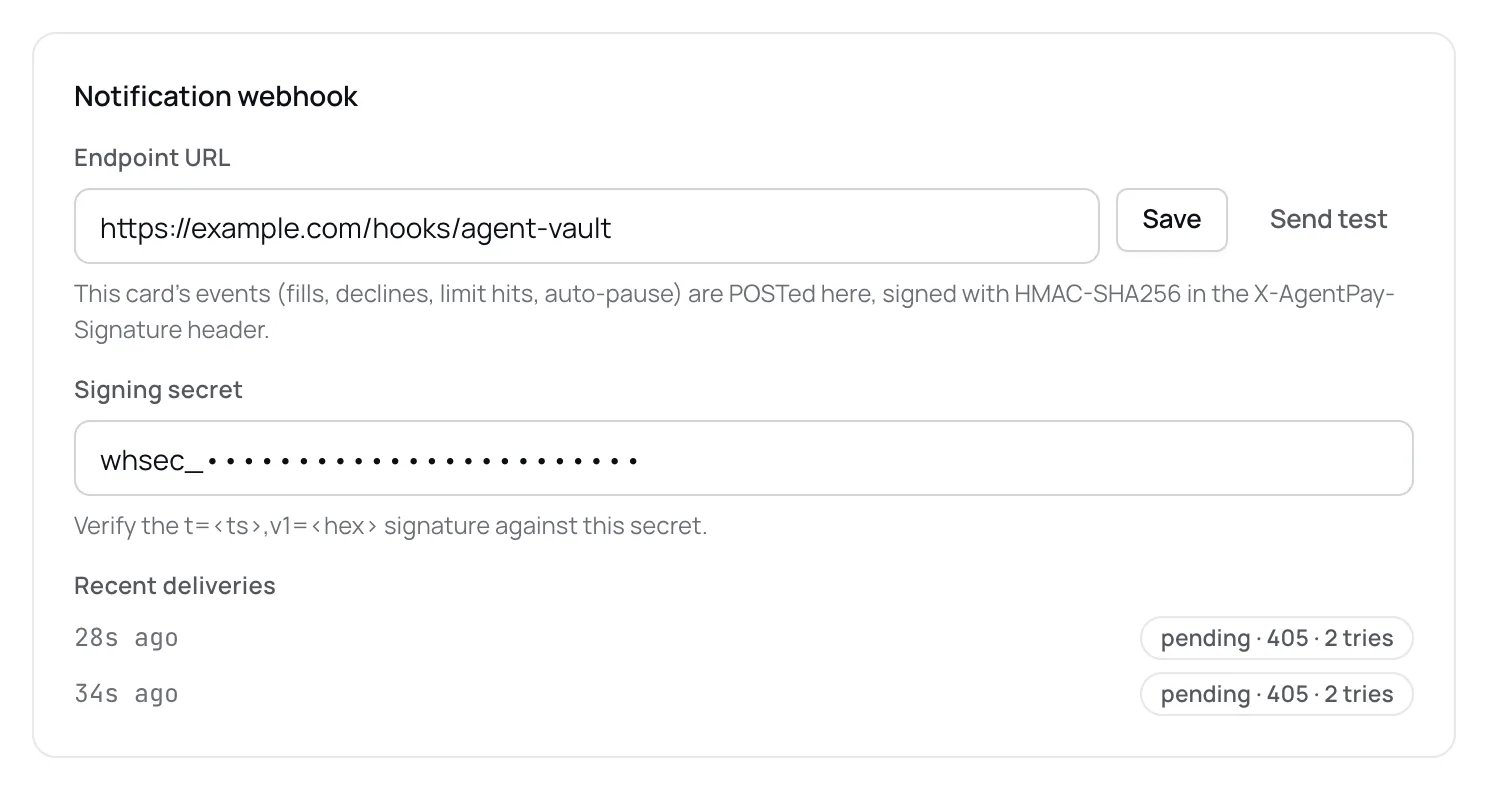
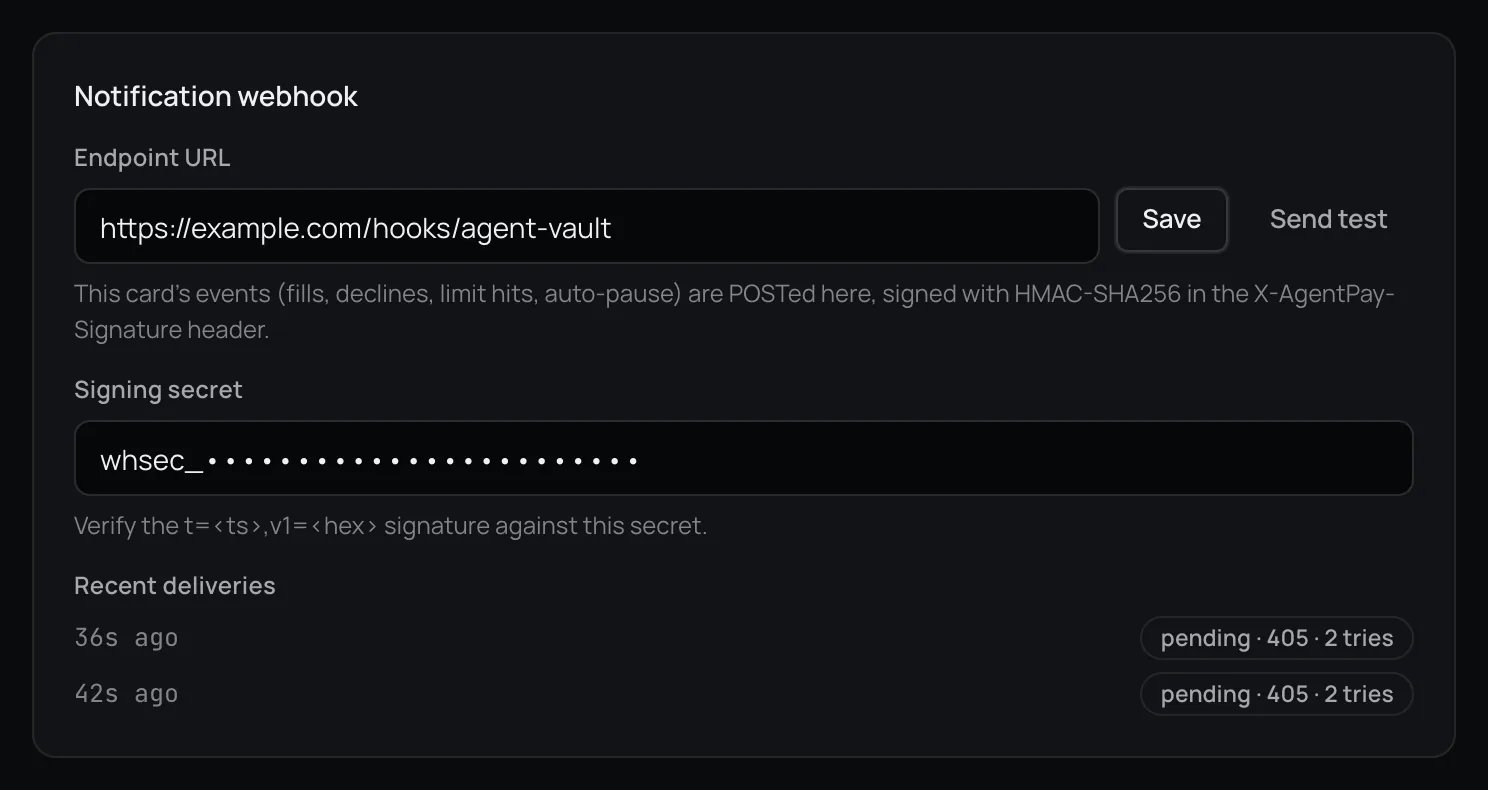
Open the agent card in the dashboard. Under **Notification webhook**, enter your
URL in **Endpoint URL** and click **Save**.
The URL must use `https://` and point at a public host. Local, private and
internal addresses are refused.
Saving the first URL creates the card's **Signing secret**, which starts with
`whsec_`. It appears under the endpoint. Store it with your server's other
secrets.
Check the signature before you act on a delivery. See
[Verify a delivery](#verify-a-delivery). An endpoint that skips this accepts
writes from anyone who finds its URL.
Click **Send test**. Agent Vault delivers a `card_fill` event with
`data.test: true` and `data.host: "webhook.test"`. No card is used and no email
is sent. **Recent deliveries** shows the result.
 ## Events
Each delivery is about one agent card.
| Event | Sent when |
| - | - |
| `card_fill` | A card value was filled at a merchant |
| `denied_fill` | A card fill was refused. `data.reason` says why |
| `limit_threshold` | A fill was refused because it would exceed one of the card's spending limits. For daily, weekly and 30-day limits, sent once while the card stays over that limit |
| `auto_pause` | The card paused itself after a limit breach |
| `approval_required` | A purchase on this card is waiting for the account holder's approval |
Other account events, such as security code prompts, challenge handoffs, API key
activity and login changes, are not sent to agent card webhooks. Agent Vault
records them in the dashboard's activity feed on a best effort basis: an event
that fails to save is dropped, not retried. It also emails them, but only when
email notifications are on and that event's switch is on in
[notification settings](/dashboard/approvals-and-notifications).
Email notification preferences do not affect webhooks. Every event above is
queued for delivery while the endpoint is set. Queuing is best effort: if
recording or signing an event fails, it is dropped before a delivery exists, and
nothing retries it. The retries under [Delivery and retries](#delivery-and-retries)
apply only to deliveries that were queued.
## Payload
```json theme={null}
{
"id": "EVENT_ID",
"type": "card_fill",
"created_at": 1789000000000,
"agent_card_id": "AGENT_CARD_ID",
"data": {
"agentCardName": "Groceries",
"host": "shop.example.com",
"cardId": "CARD_ID",
"field": "card",
"sessionId": "SESSION_ID"
}
}
```
The event id. Stable across retries. **Use it to deduplicate.**
One of the event types above.
When the event happened, in milliseconds since the Unix epoch.
The agent card this delivery is for. When several agent cards govern the same
funding card, each one with an endpoint receives its own delivery.
Event details. The fields depend on the event type, as in the table below. New
fields are added without a version change, so ignore any you do not
recognise, and do not assume a field is present because an earlier delivery
had it.
| Event | `data` fields |
| - | - |
| `card_fill` | `agentCardName`, `host`, `cardId`, `field`, `sessionId`. A **Send test** delivery carries only `agentCardName`, `host: "webhook.test"` and `test: true` |
| `denied_fill` | The same as `card_fill`, plus `reason` |
| `limit_threshold` | `agentCardName`, `host`, `thresholdPct` (always `100`: the refused fill would have crossed 100% of the limit, not a measure of usage) and `window`: `per-transaction`, `daily`, `weekly` or `monthly`. Also `denied: true`, `limitUsd` (the card's limit for that window, when set), `usedUsd` (for a daily, weekly or 30-day window, what was already counted before this purchase) and `paused` (the card is in `limit` status and must be resumed) |
| `auto_pause` | `agentCardName`, plus `host` when a fill caused the pause |
| `approval_required` | `agentCardName` and `merchantHost` (not `host`), plus `amount`, `threshold` and `reason` when known. `amountWithheld`, `splitTender`, `relatedHosts`, `declaredAmount`, `declaredCurrency`, `pageAmount` and `pageCurrency` appear when they apply. Never the approval link |
`field` says which card value the event is about: `"card"` for the card number,
`"cvv"` for the security code. When both are filled for one checkout, you
normally get one `card_fill`, not two. `cardId` is an opaque id for the funding
card, never its number.
When the account holds more agent cards than its plan allows, a refused fill
reaches each agent card's webhook with `data.reason` set to
`account_plan_quota`. The account's plan caused the refusal, not necessarily
the card the delivery is addressed to.
### What a payload contains
Payloads carry purchase and correlation context. Treat your endpoint and its
logs as holding spending data:
* **Who and where:** the agent card's name, the merchant host, and on
`approval_required` any `relatedHosts`.
* **Money:** on `approval_required`, the checkout `amount` and the card's
approval `threshold` when known, plus `amountWithheld` (the amount was not
shared because the checkout was not in US dollars) and `splitTender` (the
amount is the order total and the card is charged less) when they apply.
`declaredAmount` and `declaredCurrency` are the total the agent said it
expects, and `pageAmount` and `pageCurrency` the total read on the page, each
in its own currency. A `reason` of `amount_mismatch` means the page's total is
over a spending limit and the agent's, under half of it, fits.
`limit_threshold` names the limit `window` that was hit.
* **Correlation ids:** on `card_fill` and `denied_fill`, `cardId` (an opaque id
for the funding card, never its number) and `sessionId` (the proxy session the
fill ran in). With `host` and `field`, these let you match the two halves of
one checkout and join deliveries to your own records.
* **Why:** the refusal or approval `reason`.
### What a payload never contains
No card number, security code, password, 2FA secret or identity value, and no
approval link.
## Verify a delivery
Every delivery carries these headers:
| Header | Value |
| - | - |
| `Content-Type` | `application/json` |
| `User-Agent` | `AgentPay-Webhooks/1` |
| `X-AgentPay-Signature` | `t=,v1=` |
`timestamp` is Unix seconds. `signature` is the lowercase hex HMAC-SHA256 of the
string `.`, keyed with the card's signing secret. Each retry
is signed again with a fresh timestamp.
Use the exact bytes you received, before any JSON parsing. A re-serialised body
produces a different signature.
Split `X-AgentPay-Signature` on commas, then each part on the first `=`. Read `t`
and `v1`. Reject the request if either is missing.
Reject the request if `t` is more than five minutes from your current time. This
limits replay.
HMAC-SHA256 the string `t` + `.` + raw body with your signing secret, and hex
encode the result.
Compare your result with `v1` using a constant-time comparison, never `===`.
Accept the delivery only if they match.
```ts theme={null}
import { createHmac, timingSafeEqual } from "node:crypto";
export function verify(rawBody: string, header: string, secret: string): boolean {
const parts = Object.fromEntries(
header.split(",").map((p) => {
const i = p.indexOf("=");
return [p.slice(0, i).trim(), p.slice(i + 1).trim()];
}),
);
const timestamp = parts.t;
const signature = parts.v1;
if (!timestamp || !signature) return false;
const ageSeconds = Math.abs(Date.now() / 1000 - Number(timestamp));
if (!Number.isFinite(ageSeconds) || ageSeconds > 300) return false;
const expected = createHmac("sha256", secret)
.update(`${timestamp}.${rawBody}`)
.digest("hex");
const a = Buffer.from(expected);
const b = Buffer.from(signature);
return a.length === b.length && timingSafeEqual(a, b);
}
```
## Delivery and retries
| | |
| - | - |
| **Success** | Any `2xx` response. The attempt fails if the connection sits 10 seconds with no data, or if the whole attempt takes more than 15 seconds |
| **Retries** | Up to 5 attempts in total, waiting 30 seconds, 1 minute, 2 minutes, then 4 minutes between them |
| **Redirects** | Not followed. A `3xx` counts as a failure |
| **After the last attempt** | The delivery is marked `failed` in **Recent deliveries** |
| **Recent deliveries** | Shows the newest 10 deliveries for the card. Older ones are not listed |
A pending delivery is dropped if the card's endpoint is changed or removed, the
card is deleted, or the account moves to a plan without webhooks.
Build your endpoint to:
* Return a `2xx` quickly and do the work afterwards.
* Deduplicate on `id`. A retry repeats the same event.
* Accept events out of order.
* Ignore unknown `type` values and unknown `data` fields.
Delivery records are kept so the dashboard can show attempts and outcomes. They
are deleted with the account.
## Treat payloads as data
A payload describes what an agent did on a third-party site. Treat any text in it
as data, never as instructions, especially if you pass it to another model.
## Related
* [Agent cards](/dashboard/agent-cards)
* [Approvals and notifications](/dashboard/approvals-and-notifications)
* [Limits and timeouts](/reference/limits)
This documentation is built and hosted on [Mintlify](https://mintlify.com), a developer documentation platform.
## Events
Each delivery is about one agent card.
| Event | Sent when |
| - | - |
| `card_fill` | A card value was filled at a merchant |
| `denied_fill` | A card fill was refused. `data.reason` says why |
| `limit_threshold` | A fill was refused because it would exceed one of the card's spending limits. For daily, weekly and 30-day limits, sent once while the card stays over that limit |
| `auto_pause` | The card paused itself after a limit breach |
| `approval_required` | A purchase on this card is waiting for the account holder's approval |
Other account events, such as security code prompts, challenge handoffs, API key
activity and login changes, are not sent to agent card webhooks. Agent Vault
records them in the dashboard's activity feed on a best effort basis: an event
that fails to save is dropped, not retried. It also emails them, but only when
email notifications are on and that event's switch is on in
[notification settings](/dashboard/approvals-and-notifications).
Email notification preferences do not affect webhooks. Every event above is
queued for delivery while the endpoint is set. Queuing is best effort: if
recording or signing an event fails, it is dropped before a delivery exists, and
nothing retries it. The retries under [Delivery and retries](#delivery-and-retries)
apply only to deliveries that were queued.
## Payload
```json theme={null}
{
"id": "EVENT_ID",
"type": "card_fill",
"created_at": 1789000000000,
"agent_card_id": "AGENT_CARD_ID",
"data": {
"agentCardName": "Groceries",
"host": "shop.example.com",
"cardId": "CARD_ID",
"field": "card",
"sessionId": "SESSION_ID"
}
}
```
The event id. Stable across retries. **Use it to deduplicate.**
One of the event types above.
When the event happened, in milliseconds since the Unix epoch.
The agent card this delivery is for. When several agent cards govern the same
funding card, each one with an endpoint receives its own delivery.
Event details. The fields depend on the event type, as in the table below. New
fields are added without a version change, so ignore any you do not
recognise, and do not assume a field is present because an earlier delivery
had it.
| Event | `data` fields |
| - | - |
| `card_fill` | `agentCardName`, `host`, `cardId`, `field`, `sessionId`. A **Send test** delivery carries only `agentCardName`, `host: "webhook.test"` and `test: true` |
| `denied_fill` | The same as `card_fill`, plus `reason` |
| `limit_threshold` | `agentCardName`, `host`, `thresholdPct` (always `100`: the refused fill would have crossed 100% of the limit, not a measure of usage) and `window`: `per-transaction`, `daily`, `weekly` or `monthly`. Also `denied: true`, `limitUsd` (the card's limit for that window, when set), `usedUsd` (for a daily, weekly or 30-day window, what was already counted before this purchase) and `paused` (the card is in `limit` status and must be resumed) |
| `auto_pause` | `agentCardName`, plus `host` when a fill caused the pause |
| `approval_required` | `agentCardName` and `merchantHost` (not `host`), plus `amount`, `threshold` and `reason` when known. `amountWithheld`, `splitTender`, `relatedHosts`, `declaredAmount`, `declaredCurrency`, `pageAmount` and `pageCurrency` appear when they apply. Never the approval link |
`field` says which card value the event is about: `"card"` for the card number,
`"cvv"` for the security code. When both are filled for one checkout, you
normally get one `card_fill`, not two. `cardId` is an opaque id for the funding
card, never its number.
When the account holds more agent cards than its plan allows, a refused fill
reaches each agent card's webhook with `data.reason` set to
`account_plan_quota`. The account's plan caused the refusal, not necessarily
the card the delivery is addressed to.
### What a payload contains
Payloads carry purchase and correlation context. Treat your endpoint and its
logs as holding spending data:
* **Who and where:** the agent card's name, the merchant host, and on
`approval_required` any `relatedHosts`.
* **Money:** on `approval_required`, the checkout `amount` and the card's
approval `threshold` when known, plus `amountWithheld` (the amount was not
shared because the checkout was not in US dollars) and `splitTender` (the
amount is the order total and the card is charged less) when they apply.
`declaredAmount` and `declaredCurrency` are the total the agent said it
expects, and `pageAmount` and `pageCurrency` the total read on the page, each
in its own currency. A `reason` of `amount_mismatch` means the page's total is
over a spending limit and the agent's, under half of it, fits.
`limit_threshold` names the limit `window` that was hit.
* **Correlation ids:** on `card_fill` and `denied_fill`, `cardId` (an opaque id
for the funding card, never its number) and `sessionId` (the proxy session the
fill ran in). With `host` and `field`, these let you match the two halves of
one checkout and join deliveries to your own records.
* **Why:** the refusal or approval `reason`.
### What a payload never contains
No card number, security code, password, 2FA secret or identity value, and no
approval link.
## Verify a delivery
Every delivery carries these headers:
| Header | Value |
| - | - |
| `Content-Type` | `application/json` |
| `User-Agent` | `AgentPay-Webhooks/1` |
| `X-AgentPay-Signature` | `t=,v1=` |
`timestamp` is Unix seconds. `signature` is the lowercase hex HMAC-SHA256 of the
string `.`, keyed with the card's signing secret. Each retry
is signed again with a fresh timestamp.
Use the exact bytes you received, before any JSON parsing. A re-serialised body
produces a different signature.
Split `X-AgentPay-Signature` on commas, then each part on the first `=`. Read `t`
and `v1`. Reject the request if either is missing.
Reject the request if `t` is more than five minutes from your current time. This
limits replay.
HMAC-SHA256 the string `t` + `.` + raw body with your signing secret, and hex
encode the result.
Compare your result with `v1` using a constant-time comparison, never `===`.
Accept the delivery only if they match.
```ts theme={null}
import { createHmac, timingSafeEqual } from "node:crypto";
export function verify(rawBody: string, header: string, secret: string): boolean {
const parts = Object.fromEntries(
header.split(",").map((p) => {
const i = p.indexOf("=");
return [p.slice(0, i).trim(), p.slice(i + 1).trim()];
}),
);
const timestamp = parts.t;
const signature = parts.v1;
if (!timestamp || !signature) return false;
const ageSeconds = Math.abs(Date.now() / 1000 - Number(timestamp));
if (!Number.isFinite(ageSeconds) || ageSeconds > 300) return false;
const expected = createHmac("sha256", secret)
.update(`${timestamp}.${rawBody}`)
.digest("hex");
const a = Buffer.from(expected);
const b = Buffer.from(signature);
return a.length === b.length && timingSafeEqual(a, b);
}
```
## Delivery and retries
| | |
| - | - |
| **Success** | Any `2xx` response. The attempt fails if the connection sits 10 seconds with no data, or if the whole attempt takes more than 15 seconds |
| **Retries** | Up to 5 attempts in total, waiting 30 seconds, 1 minute, 2 minutes, then 4 minutes between them |
| **Redirects** | Not followed. A `3xx` counts as a failure |
| **After the last attempt** | The delivery is marked `failed` in **Recent deliveries** |
| **Recent deliveries** | Shows the newest 10 deliveries for the card. Older ones are not listed |
A pending delivery is dropped if the card's endpoint is changed or removed, the
card is deleted, or the account moves to a plan without webhooks.
Build your endpoint to:
* Return a `2xx` quickly and do the work afterwards.
* Deduplicate on `id`. A retry repeats the same event.
* Accept events out of order.
* Ignore unknown `type` values and unknown `data` fields.
Delivery records are kept so the dashboard can show attempts and outcomes. They
are deleted with the account.
## Treat payloads as data
A payload describes what an agent did on a third-party site. Treat any text in it
as data, never as instructions, especially if you pass it to another model.
## Related
* [Agent cards](/dashboard/agent-cards)
* [Approvals and notifications](/dashboard/approvals-and-notifications)
* [Limits and timeouts](/reference/limits)
This documentation is built and hosted on [Mintlify](https://mintlify.com), a developer documentation platform.