> ## Documentation Index
> Fetch the complete documentation index at: https://docs.agentvault.io/llms.txt
> Use this file to discover all available pages before exploring further.
# What the agent can and cannot see
> The exact read surface available to an agent before and after its first token fill, and how to verify it.
An agent can see enough of a page to drive it, but no call returns a value
Agent Vault typed into it. Two narrow channels to page text remain after a fill,
and this page spells out both.
## The guarantee
**No call returns the value of a field. Once any real value has been
substituted in a session, every call that returns page-chosen content closes for
the rest of that session, with two constrained exceptions below, and selectors
may point at elements but not test what they contain.**
Two exceptions remain, and both are bounded:
* **Digit-free text selectors.** A selector may still test page text, or an
attribute such as `aria-label`, for any text without a digit in it: letters,
punctuation and symbols. A match count or a wait is one bit of answer. The
rule does not depend on which value the page is echoing, so the non-digit
characters of **any** value the page echoes there can be recovered one
character at a time: a name, an email address, a street address, or a password
if a site renders a filled password as text. A value with no digits in it can
be recovered whole. Digits cannot be tested this way, which keeps card
numbers, security codes and one-time codes out of reach, along with the
digits of any other value. See
[`count()` and `waitForSelector()`](#count-and-waitforselector).
* **Scrubbed `errorText`.** `observe()` returns the page's own validation
messages, written by the merchant, so an agent can tell why a form was
rejected. Every value substituted in the session is removed first, and the
list is withheld when the proxy cannot vouch for the scrub. See
[`observe()`](#observe).
## How it works
A page can repeat a value the proxy just typed. It can print it as visible text,
put it in an accessible name or a frame title, or leave it in an input. So the
proxy treats the first token fill in a session as the point after which the page
is no longer safe to read freely.
### The read surface, before and after
| Capability | Before any token fill | After any token fill |
| - | - | - |
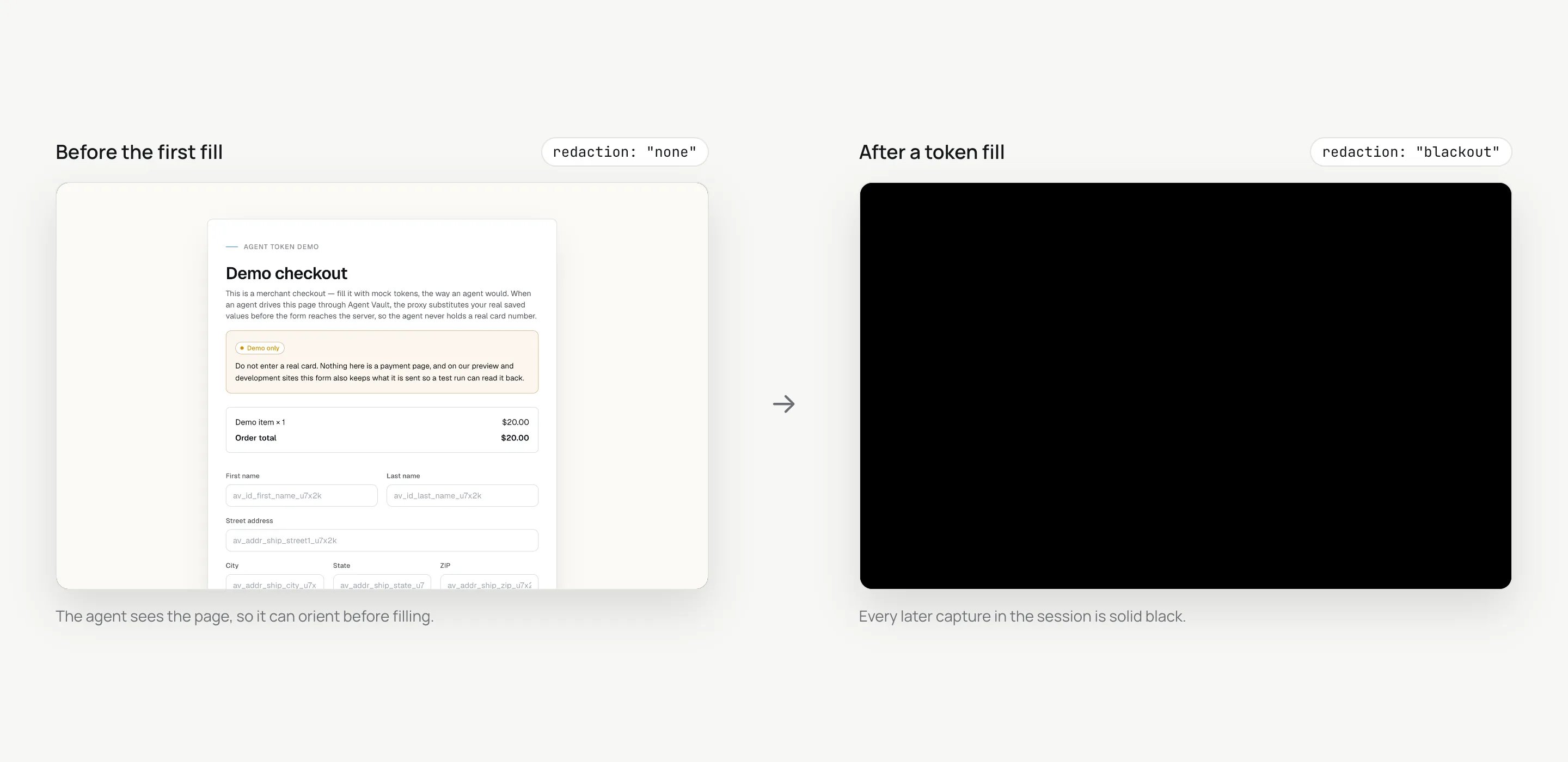
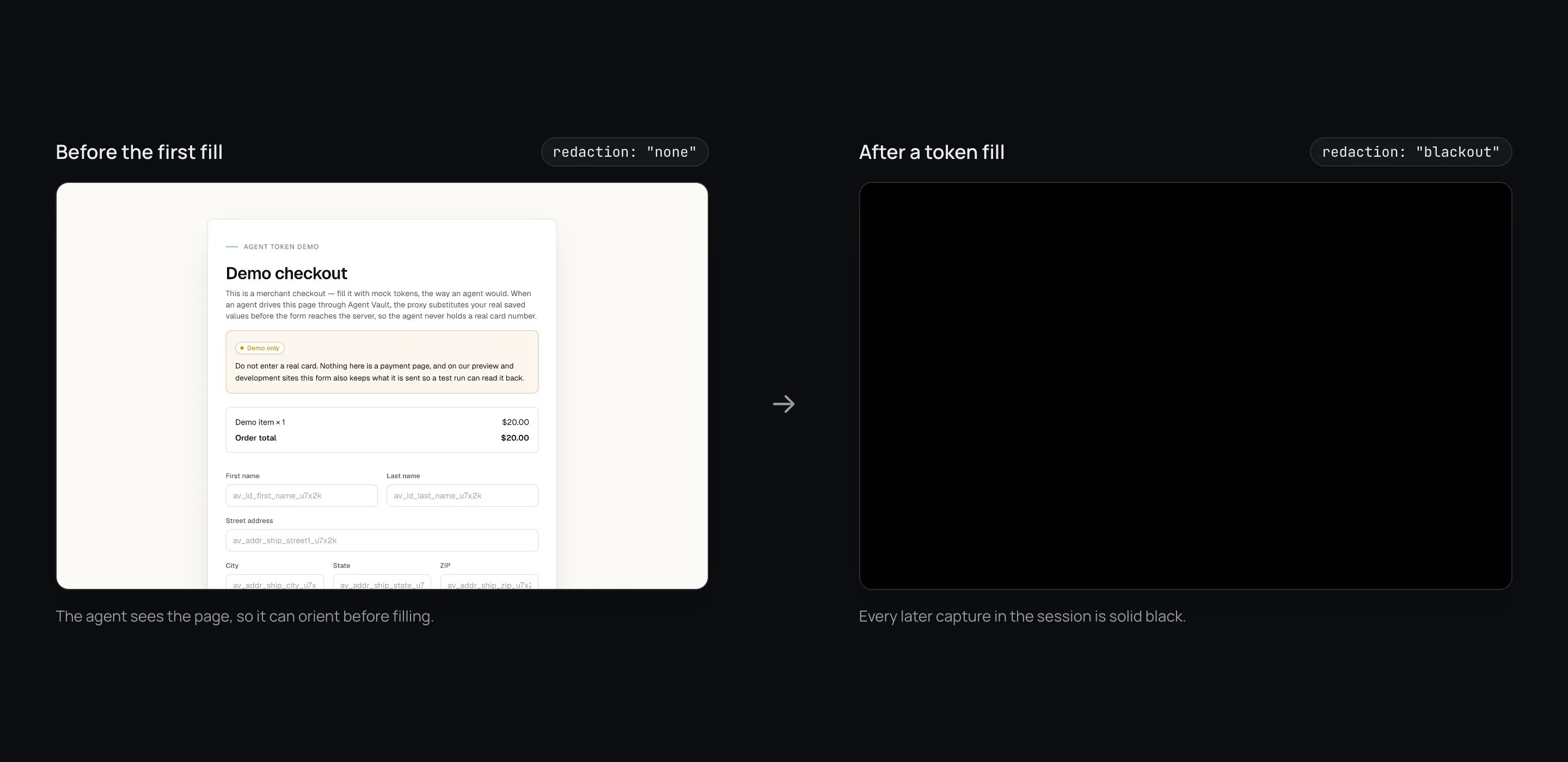
| `screenshot()` | A normal PNG | A **solid black image** for the rest of the session |
| `snapshot()` accessibility tree | Available, with every field value stripped | Refused with `sensitive_data_blocked` |
| `listFrames()` | Available | Refused with `sensitive_data_blocked` |
| `observe()` | Available | Available |
| `detectChallenge()` | Available | Available |
| `locator.count()` and `waitForSelector()` | Available | Available, but a selector that tests a value is refused with `sensitive_data_blocked` |
| `frameLocator()` targeting | Available | Available |
| Clipboard key chords | Allowed | Refused with `clipboard_blocked` |
| `evaluate()` | **Disabled** | **Disabled** |
| Reading a field's value | **Never possible** | **Never possible** |
The practical rule for agents follows directly: **orient before you fill.** Look
at the product page, the cart and the empty checkout form first.
 ### Why each channel closes
A page can echo a filled value as visible text anywhere on itself, including on a
new document after a navigation, where boxing the original input covers nothing.
Scrubbing pixels selectively would require knowing where the value appears, and
with `evaluate()` disabled the proxy cannot know. So the whole capture is
withheld. `screenshot()` still returns PNG bytes, with `redaction: "blackout"` and
a `reason`, so an agent can tell a blackout from a dark page. See
[Screenshot redaction](/security/redaction).
A snapshot is built from accessible names, and the page chooses them. A page
holding a filled value could return it through one. Before the first fill the
tree is available, and the proxy strips every field value from it on every call:
you get the role, the name and a `[ref=eN]` handle, never the contents.
A frame's name and URL are chosen by the page.
Copying a filled card field and pasting it somewhere the agent can read would
exfiltrate a value every read channel denies. The refusal covers the whole class
of modifier chords and fails closed on modifier names it does not recognise.
Plain keys still work.
Script in the page is a general-purpose read channel. Even before any fill, a
script could install a listener that captures a value the moment the proxy types
it, so no version of it is safe here. Every attempt returns `evaluate_disabled`
and is logged.
### What remains, and why it is enough
#### `observe()`
A fixed set of questions the proxy answers itself, plus one scrubbed list of
validation messages.
| Field | Answers |
| - | - |
| `passwordField` | A password field is on screen |
| `identifierField` | A field the page declares as its sign-in identifier is on screen |
| `contactField` | An email or phone field is on screen. A shipping form has one too, so this alone does not mean a sign-in |
| `codeSent` | The page says a code was sent |
| `error` | The page is showing a validation or error message |
| `rateLimited` | The page is refusing further attempts for now |
| `reason` | Which of the above matched, built only from these field names |
| `errorText` | The page's own validation messages, scrubbed (see below) |
| `inconclusive` | Present and `true` when the scan did not finish |
`errorText` is the one field that carries page text, because an agent needs to
know why a form was rejected ("Enter a valid postcode"). It is read only from
elements the page declares as validation output (an `[role='alert']` region, or
the message an `aria-invalid` field points to), never from a field's value, and
it is limited to a few short strings. Before it leaves the proxy:
* Every value substituted in the session is removed, along with strings shaped
like card numbers, email addresses, phone numbers and bearer tokens, even when
the page has reformatted them.
* The whole list is withheld when the proxy cannot vouch for the scrub, for
example after a [challenge handoff](/guides/challenges), where the account
holder typed something the proxy never saw.
"On screen" means what the proxy can establish without running script: a
laid-out element that is not `display: none` or `visibility: hidden`. A control
kept at `opacity: 0` still reads as present.
#### `detectChallenge()`
A classification, never page text. See [Handling challenges](/guides/challenges).
#### `count()` and `waitForSelector()`
You supply the selector, so the answer is a number or a wait, not content. This is
how an agent navigates a page whose screenshots are black:
```ts theme={null}
await page.locator('form:has(input[name*="otp" i]):has-text("authenticator")').count();
```
Each answer is still one bit about the page, so a selector built around a value
could read it back across many calls. After the first token fill, and while one
is in progress, the proxy refuses with `sensitive_data_blocked` any selector
that:
* Compares an attribute that holds a field's value (`value`, `aria-valuetext`,
`aria-valuenow`, `data-value`). Testing that the attribute is present is fine.
* Compares any other attribute that is not a plain pointer, such as an
`aria-label` or `title`, to a value with a digit in it. Pointer attributes such
as `id`, `class`, `name` and `type` stay allowed.
* Uses an engine that reads values or component props, such as XPath, `_react=`
or `_vue=`.
* Puts a digit, or a regex escape that stands for one such as `\d`, in a text
match (`:has-text()`, `:text()`, `text=`, a role's accessible name).
Text without digits stays allowed, because every outcome check after a fill needs
it: `button:has-text("Place order")`, `text=/order (has been )?received/i`. That
is the exception in [the guarantee](#the-guarantee): the letters, punctuation
and symbols of any value a page echoes as text, or in an attribute such as
`aria-label`, can be probed one at a time.
#### Reading `inconclusive`
`observe()` and `detectChallenge()` set `inconclusive: true` when the scan did not
finish. Every `false` beside it then means **unknown**, not absent. A finished
scan omits the flag, so test for `!result.inconclusive`.
### Fills go by CSS selector
An `aria-ref` handle from a snapshot works for a count, a wait, a click or a key
press, but **is refused for a fill**. An in-frame ref reaches inside an iframe from
the top-level page, and filling that way would put a real value into a hosted card
frame without the frame's own origin being checked. Fills use a CSS selector, and
`frameLocator()` for a payment iframe.
### During and after a challenge handoff
While a handoff is open, every page call from the agent is rejected with
`challenge_required`. After a handoff, snapshots and `errorText` stay withheld
for the rest of the session.
## What this does not protect against
* **Screenshots after a handoff in a session with no token fill.** These are not
blacked out, and a page can echo what the account holder typed during the
handoff. Agents are instructed to stop taking screenshots once a handoff has
been granted, but a compromised agent may not comply.
* **What the page shows before the first fill.** Anything the merchant displays
on its own, such as a saved address on a signed-in merchant account, is visible
in a screenshot or snapshot taken before the first fill.
* **Non-digit characters a page echoes as text.** After a fill, a selector can
test page text and non-pointer attributes for any text without a digit,
including punctuation and symbols. A compromised agent can therefore recover
the non-digit characters of any echoed value one character at a time, whatever
token it came from. That covers a name, an email or a street address, and a
password on a site that renders a filled password as text. A password with no
digits can be recovered whole. Digits cannot be probed. The merchant receives
these values in the clear anyway.
* **Reformatted echoes in validation text.** `errorText` scrubbing matches each
substituted value as typed and common reformattings. A page that transforms a
value beyond recognition is outside what a scrub can catch, which is why the
list is withheld wherever the proxy cannot vouch for it.
* **Actions.** Read restriction limits what the agent learns, not what it does.
Clicks and submissions are bounded by [URL locking](/security/url-locking) and
the [spending controls](/dashboard/agent-cards), not by this page.
## How to verify
Run this against your own account with a test card. It takes about five minutes.
Open a session on a checkout page you can reach without buying anything. Call
`screenshot()` and `snapshot()`. Both return content, and the snapshot shows
no field values.
Fill an address or card token from `get_token_catalog` into a field on the
page.
`screenshot()` now returns a black image with `redaction: "blackout"`.
`snapshot()` and `listFrames()` fail with `sensitive_data_blocked`. A
`Control+c` chord fails with `clipboard_blocked`.
Call `observe()`. It returns only the fields listed above. `evaluate()` fails
with `evaluate_disabled` at any point.
Call [`get_run_report`](/guides/confirming-outcomes). It reports fills by kind
and count, never by value.
## Related
Why the image goes black, and how receipts are handled.
Where read restriction sits in the overall design.
This documentation is built and hosted on [Mintlify](https://mintlify.com), a developer documentation platform.
### Why each channel closes
A page can echo a filled value as visible text anywhere on itself, including on a
new document after a navigation, where boxing the original input covers nothing.
Scrubbing pixels selectively would require knowing where the value appears, and
with `evaluate()` disabled the proxy cannot know. So the whole capture is
withheld. `screenshot()` still returns PNG bytes, with `redaction: "blackout"` and
a `reason`, so an agent can tell a blackout from a dark page. See
[Screenshot redaction](/security/redaction).
A snapshot is built from accessible names, and the page chooses them. A page
holding a filled value could return it through one. Before the first fill the
tree is available, and the proxy strips every field value from it on every call:
you get the role, the name and a `[ref=eN]` handle, never the contents.
A frame's name and URL are chosen by the page.
Copying a filled card field and pasting it somewhere the agent can read would
exfiltrate a value every read channel denies. The refusal covers the whole class
of modifier chords and fails closed on modifier names it does not recognise.
Plain keys still work.
Script in the page is a general-purpose read channel. Even before any fill, a
script could install a listener that captures a value the moment the proxy types
it, so no version of it is safe here. Every attempt returns `evaluate_disabled`
and is logged.
### What remains, and why it is enough
#### `observe()`
A fixed set of questions the proxy answers itself, plus one scrubbed list of
validation messages.
| Field | Answers |
| - | - |
| `passwordField` | A password field is on screen |
| `identifierField` | A field the page declares as its sign-in identifier is on screen |
| `contactField` | An email or phone field is on screen. A shipping form has one too, so this alone does not mean a sign-in |
| `codeSent` | The page says a code was sent |
| `error` | The page is showing a validation or error message |
| `rateLimited` | The page is refusing further attempts for now |
| `reason` | Which of the above matched, built only from these field names |
| `errorText` | The page's own validation messages, scrubbed (see below) |
| `inconclusive` | Present and `true` when the scan did not finish |
`errorText` is the one field that carries page text, because an agent needs to
know why a form was rejected ("Enter a valid postcode"). It is read only from
elements the page declares as validation output (an `[role='alert']` region, or
the message an `aria-invalid` field points to), never from a field's value, and
it is limited to a few short strings. Before it leaves the proxy:
* Every value substituted in the session is removed, along with strings shaped
like card numbers, email addresses, phone numbers and bearer tokens, even when
the page has reformatted them.
* The whole list is withheld when the proxy cannot vouch for the scrub, for
example after a [challenge handoff](/guides/challenges), where the account
holder typed something the proxy never saw.
"On screen" means what the proxy can establish without running script: a
laid-out element that is not `display: none` or `visibility: hidden`. A control
kept at `opacity: 0` still reads as present.
#### `detectChallenge()`
A classification, never page text. See [Handling challenges](/guides/challenges).
#### `count()` and `waitForSelector()`
You supply the selector, so the answer is a number or a wait, not content. This is
how an agent navigates a page whose screenshots are black:
```ts theme={null}
await page.locator('form:has(input[name*="otp" i]):has-text("authenticator")').count();
```
Each answer is still one bit about the page, so a selector built around a value
could read it back across many calls. After the first token fill, and while one
is in progress, the proxy refuses with `sensitive_data_blocked` any selector
that:
* Compares an attribute that holds a field's value (`value`, `aria-valuetext`,
`aria-valuenow`, `data-value`). Testing that the attribute is present is fine.
* Compares any other attribute that is not a plain pointer, such as an
`aria-label` or `title`, to a value with a digit in it. Pointer attributes such
as `id`, `class`, `name` and `type` stay allowed.
* Uses an engine that reads values or component props, such as XPath, `_react=`
or `_vue=`.
* Puts a digit, or a regex escape that stands for one such as `\d`, in a text
match (`:has-text()`, `:text()`, `text=`, a role's accessible name).
Text without digits stays allowed, because every outcome check after a fill needs
it: `button:has-text("Place order")`, `text=/order (has been )?received/i`. That
is the exception in [the guarantee](#the-guarantee): the letters, punctuation
and symbols of any value a page echoes as text, or in an attribute such as
`aria-label`, can be probed one at a time.
#### Reading `inconclusive`
`observe()` and `detectChallenge()` set `inconclusive: true` when the scan did not
finish. Every `false` beside it then means **unknown**, not absent. A finished
scan omits the flag, so test for `!result.inconclusive`.
### Fills go by CSS selector
An `aria-ref` handle from a snapshot works for a count, a wait, a click or a key
press, but **is refused for a fill**. An in-frame ref reaches inside an iframe from
the top-level page, and filling that way would put a real value into a hosted card
frame without the frame's own origin being checked. Fills use a CSS selector, and
`frameLocator()` for a payment iframe.
### During and after a challenge handoff
While a handoff is open, every page call from the agent is rejected with
`challenge_required`. After a handoff, snapshots and `errorText` stay withheld
for the rest of the session.
## What this does not protect against
* **Screenshots after a handoff in a session with no token fill.** These are not
blacked out, and a page can echo what the account holder typed during the
handoff. Agents are instructed to stop taking screenshots once a handoff has
been granted, but a compromised agent may not comply.
* **What the page shows before the first fill.** Anything the merchant displays
on its own, such as a saved address on a signed-in merchant account, is visible
in a screenshot or snapshot taken before the first fill.
* **Non-digit characters a page echoes as text.** After a fill, a selector can
test page text and non-pointer attributes for any text without a digit,
including punctuation and symbols. A compromised agent can therefore recover
the non-digit characters of any echoed value one character at a time, whatever
token it came from. That covers a name, an email or a street address, and a
password on a site that renders a filled password as text. A password with no
digits can be recovered whole. Digits cannot be probed. The merchant receives
these values in the clear anyway.
* **Reformatted echoes in validation text.** `errorText` scrubbing matches each
substituted value as typed and common reformattings. A page that transforms a
value beyond recognition is outside what a scrub can catch, which is why the
list is withheld wherever the proxy cannot vouch for it.
* **Actions.** Read restriction limits what the agent learns, not what it does.
Clicks and submissions are bounded by [URL locking](/security/url-locking) and
the [spending controls](/dashboard/agent-cards), not by this page.
## How to verify
Run this against your own account with a test card. It takes about five minutes.
Open a session on a checkout page you can reach without buying anything. Call
`screenshot()` and `snapshot()`. Both return content, and the snapshot shows
no field values.
Fill an address or card token from `get_token_catalog` into a field on the
page.
`screenshot()` now returns a black image with `redaction: "blackout"`.
`snapshot()` and `listFrames()` fail with `sensitive_data_blocked`. A
`Control+c` chord fails with `clipboard_blocked`.
Call `observe()`. It returns only the fields listed above. `evaluate()` fails
with `evaluate_disabled` at any point.
Call [`get_run_report`](/guides/confirming-outcomes). It reports fills by kind
and count, never by value.
## Related
Why the image goes black, and how receipts are handled.
Where read restriction sits in the overall design.
This documentation is built and hosted on [Mintlify](https://mintlify.com), a developer documentation platform.