> ## Documentation Index
> Fetch the complete documentation index at: https://docs.agentvault.io/llms.txt
> Use this file to discover all available pages before exploring further.
# Security model
> The threat model behind Agent Vault: what it protects, who it defends against, and where its protection ends.
This page sets out what Agent Vault protects, the attackers it is designed
against, what an attacker gains if an agent is fully compromised, and the limits
of the design.
## In this page
* **The premise.** The AI agent is treated as untrusted. It never holds a working
credential, only inert [mock tokens](/reference/glossary).
* **The mechanism.** Agent Vault's proxy, a browser that Agent Vault operates,
substitutes the real value into the merchant page at the moment of the fill,
under the account holder's rules.
* **The result.** A compromised agent can, at most, make purchases the account
holder's limits already allow, at merchants they already allow, and attempts
are recorded on a best-effort basis.
## System overview
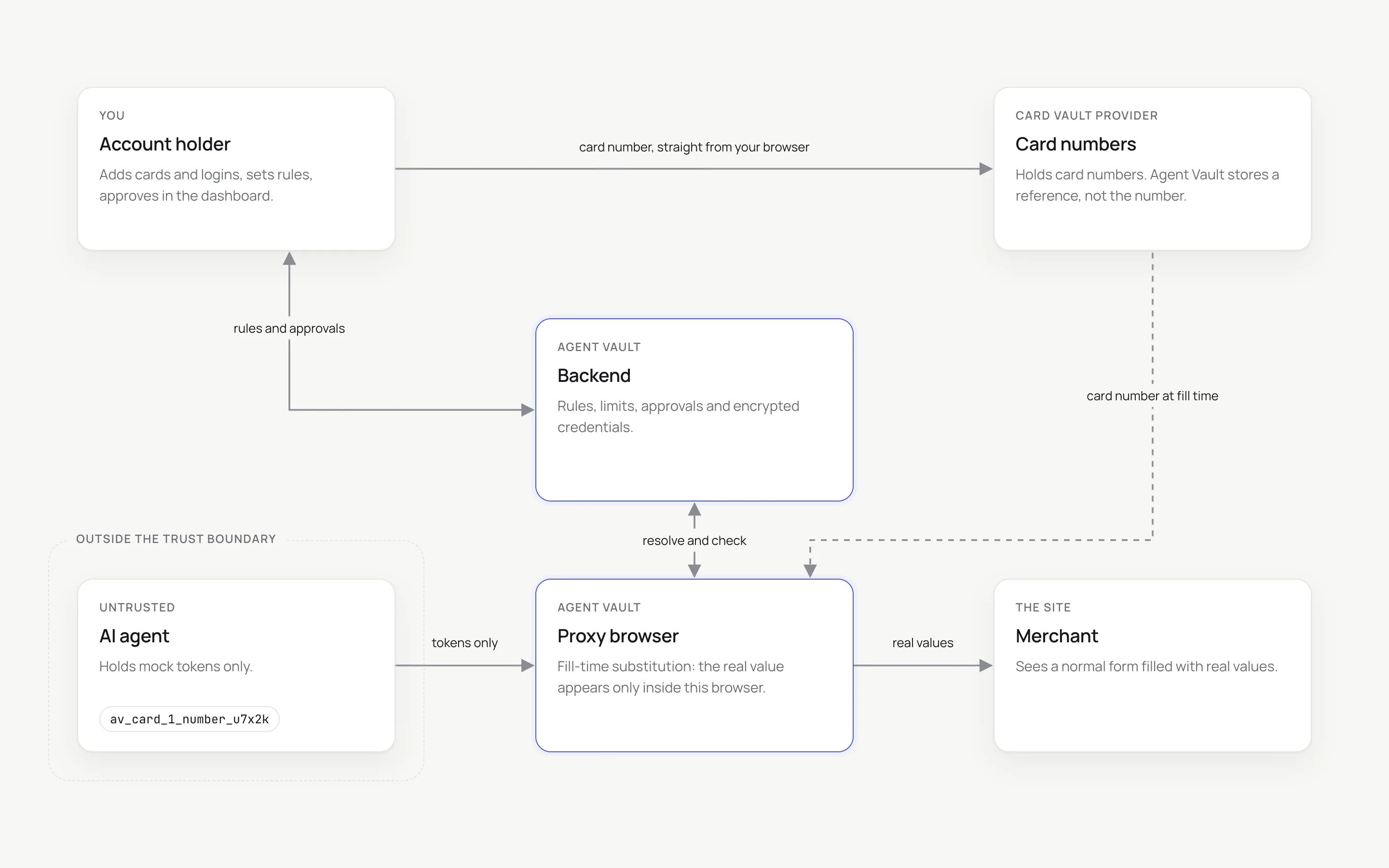
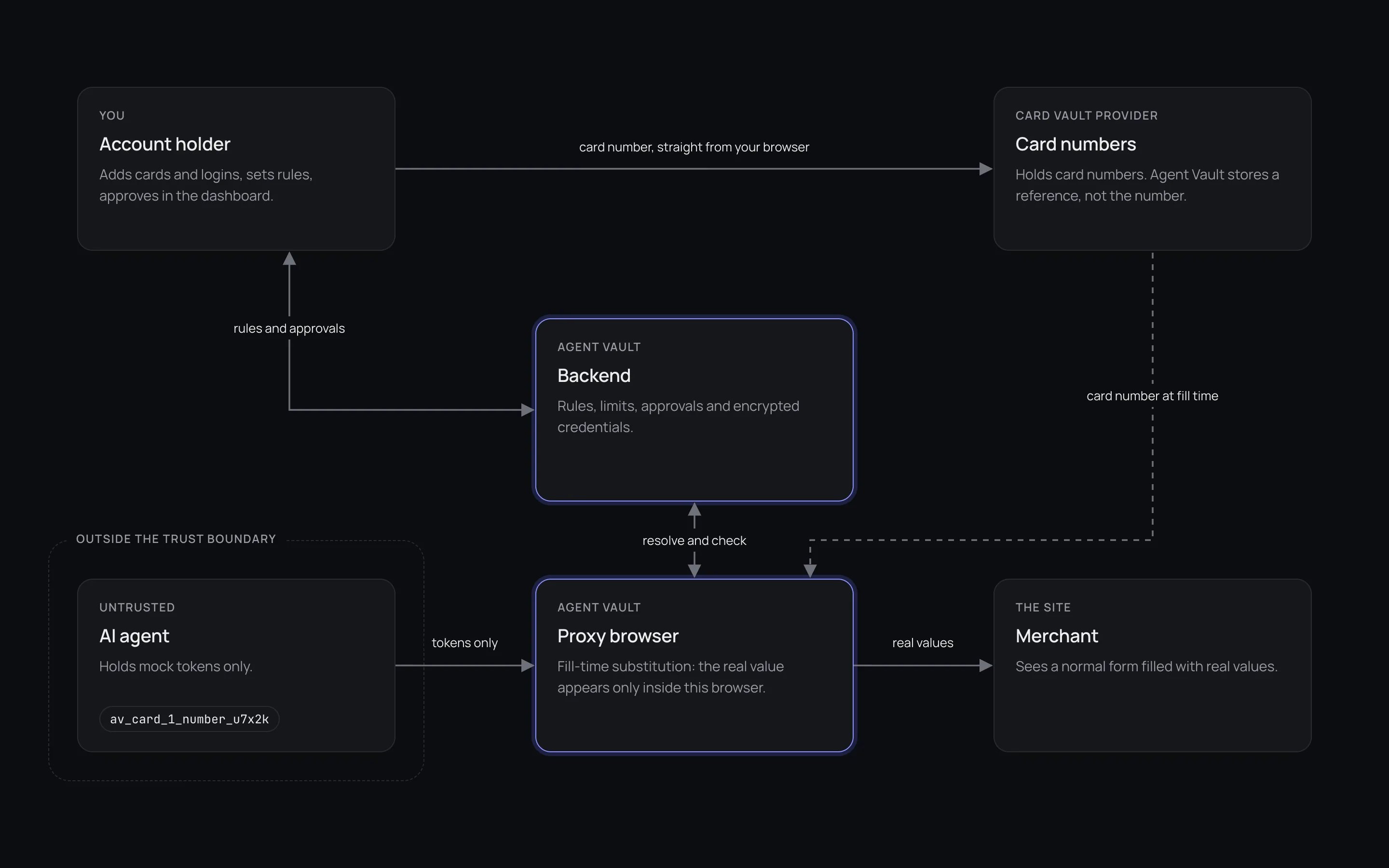 | Component | Role | Holds real values |
| - | - | - |
| Account holder's dashboard | Adds cards and logins, sets rules, approves purchases, enters a CVV when asked | Only what the holder types |
| AI agent | Drives a checkout or sign-in through the SDK or MCP server | **No.** Mock tokens and non-secret metadata only. No real value is returned to it directly, but a compromised agent can probe the non-digit characters (letters, punctuation and symbols) of any value a merchant page echoes as text, a password included if the site renders one. See [the digit-free echo exception](/security/agent-context#the-guarantee) |
| Agent Vault backend | Stores rules, limits, keys and encrypted login credentials. Decides whether each fill is allowed | Encrypted passwords and authenticator secrets. **No card numbers, no CVVs** |
| Agent Vault proxy | Runs the browser the agent drives, and types real values into the page | A real value in memory, used for one fill. After the fill, the spellings a page may print it in stay in memory until the session closes, only to scrub them from later output to the agent. See [Screenshot redaction](/security/redaction#values-kept-for-scrubbing) |
| Card vault provider | Stores card numbers, tokenized directly from the holder's browser | Card numbers |
| Merchant | Receives the payment details, as it would from a person typing them | What it is given |
## Assets
| Asset | Where it lives | How it is protected |
| - | - | - |
| Card number (PAN) | The card vault provider | Tokenized in the holder's browser; revealed only to the proxy, only for an authorized fill. See [Card storage](/security/card-storage) |
| Card security code (CVV) | Only in the proxy's memory, for the session that needs it | Never stored or written down. On a deployment with live CVV entry, entered live by the holder when a checkout needs it, typed into the merchant's field, then kept in proxy memory only to scrub it from later output, until the session closes. Without live entry, a checkout that needs one fails with `cvv_entry_required`. See [CVV policy](/security/cvv-policy) |
| Login passwords | Agent Vault backend | Encrypted at rest. Released only for a fill on the login's registered site. See [URL locking](/security/url-locking) |
| Authenticator (TOTP) secrets | Agent Vault backend | Encrypted at rest. A stored secret is never released: only a current code is. During enrolment by an agent, the proxy reads the new secret off the site's page and sends it to the backend to encrypt, so the proxy holds it in memory on that one path. See [TOTP handling](/security/totp#enrolment-by-an-agent) |
| Name, email, phone, addresses | Agent Vault backend | Handed to the agent as tokens, never as text. A merchant page that echoes one as text can have its non-digit characters probed, not its digits. The same holds for any echoed value, a password included. See [the digit-free echo exception](/security/agent-context#the-guarantee) |
| Spending authority | Agent card rules | Caps, merchant rules and an approval threshold, enforced at every card fill |
| API keys | The agent's environment | Scoped per agent, revocable, and revoked automatically on cross-account probing |
| Session records | Agent Vault backend | Record the kind of each fill and each refusal, on a best-effort basis, never a substituted value |
## Who we defend against
An agent reads web pages, emails and tool output, and any of them can carry an
instruction. Prompt injection is part of the normal operating environment, so the
design assumes the agent will at some point follow an attacker's instructions.
The question the design answers is what the attacker gains when it does.
A page the agent visits may imitate a real sign-in, try to receive a credential,
or try to read back a value the proxy typed, through visible text, accessible
names, frame titles or the clipboard. See
[What the agent can see](/security/agent-context) and
[URL locking](/security/url-locking).
An API key is a bearer credential. A key that leaks gives its holder no more
than the agent it was issued to: the same scope, the same card rules and the
same audit trail.
Every token carries its account in its own grammar. A token from another account
is refused, and repeated attempts revoke the key that made them.
Real values are never typed into a plaintext `http://` page or frame on a
non-loopback host, or into a frame whose TLS status cannot be established. The
only plaintext pages allowed are loopback ones (`localhost`, `127.0.0.1` and the
like) used for local demos, whose bytes never leave the proxy's machine. See
[URL locking](/security/url-locking#plaintext-pages-are-refused).
## If the agent is fully compromised
Assume an attacker controls the agent completely: its prompt, its tools and its
API key.
| The attacker has | The attacker does not have |
| - | - |
| Mock tokens for the cards, logins and addresses in the key's scope | Any real card number |
| Card brand, last four digits and expiry | Any CVV |
| The sites each login is registered for | Any password, apart from the non-digit characters of one a site echoes as text (last row) |
| Whether a login has two-factor authentication | Any authenticator secret or code |
| The account's own id | Anything belonging to another account |
| The ability to drive a browser session | The ability to read a field's value, run script in the page or see a screenshot after a fill |
| The non-digit characters (letters, punctuation and symbols) of any value a merchant page echoes as text, probed one character at a time: a name, email or street address, or a password on a site that renders one. A value with no digits can be recovered whole | Any digit of an echoed value, which selectors cannot test |
Every token the attacker holds is checked again at the moment it is filled:
```mermaid theme={null}
flowchart TD
T[Stolen mock token] --> A{Filled through
| Component | Role | Holds real values |
| - | - | - |
| Account holder's dashboard | Adds cards and logins, sets rules, approves purchases, enters a CVV when asked | Only what the holder types |
| AI agent | Drives a checkout or sign-in through the SDK or MCP server | **No.** Mock tokens and non-secret metadata only. No real value is returned to it directly, but a compromised agent can probe the non-digit characters (letters, punctuation and symbols) of any value a merchant page echoes as text, a password included if the site renders one. See [the digit-free echo exception](/security/agent-context#the-guarantee) |
| Agent Vault backend | Stores rules, limits, keys and encrypted login credentials. Decides whether each fill is allowed | Encrypted passwords and authenticator secrets. **No card numbers, no CVVs** |
| Agent Vault proxy | Runs the browser the agent drives, and types real values into the page | A real value in memory, used for one fill. After the fill, the spellings a page may print it in stay in memory until the session closes, only to scrub them from later output to the agent. See [Screenshot redaction](/security/redaction#values-kept-for-scrubbing) |
| Card vault provider | Stores card numbers, tokenized directly from the holder's browser | Card numbers |
| Merchant | Receives the payment details, as it would from a person typing them | What it is given |
## Assets
| Asset | Where it lives | How it is protected |
| - | - | - |
| Card number (PAN) | The card vault provider | Tokenized in the holder's browser; revealed only to the proxy, only for an authorized fill. See [Card storage](/security/card-storage) |
| Card security code (CVV) | Only in the proxy's memory, for the session that needs it | Never stored or written down. On a deployment with live CVV entry, entered live by the holder when a checkout needs it, typed into the merchant's field, then kept in proxy memory only to scrub it from later output, until the session closes. Without live entry, a checkout that needs one fails with `cvv_entry_required`. See [CVV policy](/security/cvv-policy) |
| Login passwords | Agent Vault backend | Encrypted at rest. Released only for a fill on the login's registered site. See [URL locking](/security/url-locking) |
| Authenticator (TOTP) secrets | Agent Vault backend | Encrypted at rest. A stored secret is never released: only a current code is. During enrolment by an agent, the proxy reads the new secret off the site's page and sends it to the backend to encrypt, so the proxy holds it in memory on that one path. See [TOTP handling](/security/totp#enrolment-by-an-agent) |
| Name, email, phone, addresses | Agent Vault backend | Handed to the agent as tokens, never as text. A merchant page that echoes one as text can have its non-digit characters probed, not its digits. The same holds for any echoed value, a password included. See [the digit-free echo exception](/security/agent-context#the-guarantee) |
| Spending authority | Agent card rules | Caps, merchant rules and an approval threshold, enforced at every card fill |
| API keys | The agent's environment | Scoped per agent, revocable, and revoked automatically on cross-account probing |
| Session records | Agent Vault backend | Record the kind of each fill and each refusal, on a best-effort basis, never a substituted value |
## Who we defend against
An agent reads web pages, emails and tool output, and any of them can carry an
instruction. Prompt injection is part of the normal operating environment, so the
design assumes the agent will at some point follow an attacker's instructions.
The question the design answers is what the attacker gains when it does.
A page the agent visits may imitate a real sign-in, try to receive a credential,
or try to read back a value the proxy typed, through visible text, accessible
names, frame titles or the clipboard. See
[What the agent can see](/security/agent-context) and
[URL locking](/security/url-locking).
An API key is a bearer credential. A key that leaks gives its holder no more
than the agent it was issued to: the same scope, the same card rules and the
same audit trail.
Every token carries its account in its own grammar. A token from another account
is refused, and repeated attempts revoke the key that made them.
Real values are never typed into a plaintext `http://` page or frame on a
non-loopback host, or into a frame whose TLS status cannot be established. The
only plaintext pages allowed are loopback ones (`localhost`, `127.0.0.1` and the
like) used for local demos, whose bytes never leave the proxy's machine. See
[URL locking](/security/url-locking#plaintext-pages-are-refused).
## If the agent is fully compromised
Assume an attacker controls the agent completely: its prompt, its tools and its
API key.
| The attacker has | The attacker does not have |
| - | - |
| Mock tokens for the cards, logins and addresses in the key's scope | Any real card number |
| Card brand, last four digits and expiry | Any CVV |
| The sites each login is registered for | Any password, apart from the non-digit characters of one a site echoes as text (last row) |
| Whether a login has two-factor authentication | Any authenticator secret or code |
| The account's own id | Anything belonging to another account |
| The ability to drive a browser session | The ability to read a field's value, run script in the page or see a screenshot after a fill |
| The non-digit characters (letters, punctuation and symbols) of any value a merchant page echoes as text, probed one character at a time: a name, email or street address, or a password on a site that renders one. A value with no digits can be recovered whole | Any digit of an echoed value, which selectors cannot test |
Every token the attacker holds is checked again at the moment it is filled:
```mermaid theme={null}
flowchart TD
T[Stolen mock token] --> A{Filled through
the proxy?}
A -- No --> X1[The literal token string is typed.
It is worthless anywhere else]
A -- Yes --> B{Same account
as the session?}
B -- No --> X2[cross_user_denied.
Three in five minutes revokes the key]
B -- Yes --> C{Within the key's
scope?}
C -- No --> X3[scope_denied]
C -- Yes --> D{Allowed on
this site?}
D -- No --> X4[login_blocked or merchant_blocked]
D -- Yes --> E{Within the holder's
limits and approval rules?}
E -- No --> X5[Refused, or held for approval]
E -- Yes --> F[Real value typed into the page.
Bounded by the holder's rules and recorded]
```
The worst case is therefore not "the attacker has your card". For a card an
agent card governs, it is "the attacker can spend up to your per-transaction
cap on each fill, at a merchant you allowed, and the attempt normally appears in
your activity feed". Repeated fills add up: the total is bounded only by the
daily, weekly or monthly caps you set and by your plan's payment quota, so set a
rolling cap if you want an overall limit. The feed is best effort: a session event that fails to save is
dropped, not retried.
That bound holds only where a cap exists. Only your first card gets a starter
agent card, so every card you add after it starts ungoverned. A card no agent
card governs shows **No limits** on **Cards**. It has no spending caps and no
merchant rules, so an attacker holding a key that can use it can fill it for any
amount on any [authorized destination](/dashboard/destinations), including a
checkout whose total cannot be read. The only count that still applies is the
plan's payment quota: 5 or 100 payments in a rolling 30 days on Free or Plus,
then `plan_quota_reached`. Enterprise has no payment quota, and preview,
development, test and staging deployments are not metered, so there it has no
bound at all.
Click **Add limits** on every such card. See
[Cards](/dashboard/cards).
## Security properties
Real values are revealed only to the proxy, only for an authorized fill, and
are never returned to the agent. The non-digit characters of a value a
merchant page echoes as text are the one exception.
A login resolves only on the site it is registered for. A token filled on a
look-alike page is refused.
Each API key is scoped to specific cards and logins, and cannot create
credentials unless granted.
Caps, merchant rules and an approval threshold are enforced at the fill, not
advised.
After any fill, screenshots go black and calls that return page content
close, except scrubbed validation messages. Selectors can test page text for
any non-digit characters, never for digits.
Sessions, fill kinds and refusals are recorded on a best-effort basis. No
substituted value is ever written down.
## What depends on the account holder
Agent Vault bounds what an agent can do. The account holder sets those bounds and
remains responsible for the following.
Whoever signs in to the dashboard controls the vault. Use a strong, unique
sign-in and the strongest second factor your sign-in provider offers.
A key limited to the cards and logins one agent needs makes a revocation
surgical. See [API keys](/dashboard/api-keys).
Per-transaction and period caps, merchant rules and an approval threshold
are the controls that bound a compromised agent. See
[Agent cards](/dashboard/agent-cards).
Each prompt names the merchant, and an approval names the amount where one
is known. Approve or enter a code only for a purchase you expect. Prompt links work on their own
without a dashboard sign-in, so treat them like a password while they are
open. See [Keep request links private](/dashboard/approvals-and-notifications#keep-request-links-private).
Do not paste a card number, CVV, password or one-time code into the agent's
chat. Anything typed there leaves Agent Vault's protection entirely.
The [Activity](/dashboard/activity) feed shows sessions, fills and
refusals, recorded on a best-effort basis. A revoked key resolves no further
tokens, and a session it already opened closes within about a minute.
## Limitations
Agent Vault is explicit about where its protection ends.
An attacker signed in to the dashboard as the account holder has the holder's
vault. The agent-facing design does not protect against this.
A key works for anyone who holds it, up to its scope and the card rules, until it
is revoked. Scoping and limits bound the damage; they do not prevent use.
The merchant receives a real card number, exactly as it would if the holder typed
it. Agent Vault cannot control what a merchant, or any script on the merchant's
page, does with it.
An agent that buys the wrong item from an allowed merchant under the cap has done
nothing the system prevents. Limits bound the damage; they do not supply
judgement. The approval threshold is for purchases where the holder wants to
decide.
At the moment of a fill, the real value is in the proxy's memory, and login
passwords and authenticator secrets are decrypted by the Agent Vault backend to serve
it. When an agent enrols a site's authenticator, the proxy also reads the new
secret off the page and passes it to the backend. After the fill, the proxy keeps the value's spellings in memory until the
session closes, to scrub them from what the agent is later shown. Agent Vault's own infrastructure is therefore inside the trust boundary.
[Attested detokenization](/security/attested-detokenization) narrows this for
card numbers and is off by default.
A confirmation page can print the submitted email or shipping address as ordinary
text, and some sites render a filled password as text. This is mitigated, not
solved: screenshots black out for the whole session, and no receipt image is
stored for a session that filled a token. A compromised agent can still probe the
non-digit characters of any such echo (letters, punctuation and symbols) one at a
time with text selectors, whichever token the value came from. A value with no
digits can be recovered whole. Digits cannot be probed. See
[What the agent can see](/security/agent-context#count-and-waitforselector) and
[Screenshot redaction](/security/redaction).
If the proxy cannot read the total, it cannot apply a cap to it. It fails closed
where a control exists: a capped card is refused and a card with an approval
threshold holds for the holder. This turns some legitimate checkouts into
refusals. A card with no cap and no threshold, including one marked **No
limits**, accepts the fill and records it with an unknown amount, counted against
the plan's payment quota.
[Page hints](/guides/page-hints) let an agent point the proxy at the total.
Challenge detection and page observations are heuristics over a page the proxy
does not control. They fail toward "unknown" rather than "safe", but they can be
wrong.
Cards are filled with their card number. Scheme network tokens are not
provisioned for any card. See
[Card storage](/security/card-storage#network-tokenization).
## Defence in depth
Several checks run in both the proxy and the Agent Vault backend, so a fault in one
does not open the other.
| Check | Proxy | Agent Vault backend |
| - | - | - |
| Token belongs to this account | Yes, and counts strikes toward revocation | Yes |
| Key scope | | Yes, reloaded on every resolution |
| URL lock | Yes, at the fill | Yes, also in the catalog filter |
| Merchant rules | Yes, at the fill | Yes |
| Spending limits | | Yes, when the transaction is recorded |
## Fail closed by default
Where a check cannot be completed, the answer is no, with one exception: a card
with no cap and no approval threshold has nothing to check an unreadable total
against.
| Situation | Behaviour |
| - | - |
| The order total cannot be read, and an approval threshold is set | Hold and ask the holder |
| The order total cannot be read, and a cap is set | Refuse |
| The order total cannot be read, and no cap or threshold applies | Allow under the plan's payment quota, recorded with an unknown amount |
| A frame's TLS status cannot be established | Refuse the fill |
| A required tunnel is not live | Refuse to launch the session |
| Attested detokenization is required and cannot be proven | Refuse the reveal |
| A plan value is absent or unrecognised | Apply the tightest tier |
## How to verify
Each property page ends with a short procedure you can run against your own
account with the SDK or MCP server and a test card. Start with
[URL locking](/security/url-locking#how-to-verify) and
[What the agent can see](/security/agent-context#how-to-verify).
## Compliance scope
This site states the facts below and makes no further compliance claim.
* Card numbers are stored by our card vault provider, which holds a current
PCI DSS Level 1 attestation as a service provider. We do not name the
provider on this site.
* The Agent Vault backend never receives a card number. See
[Card storage](/security/card-storage).
* On the hosted service, the proxy is the one Agent Vault component that
handles a card number. It holds the number in memory to type it into the
merchant's form, and keeps it in memory afterwards only to scrub it from what
the agent sees. A self-hosted deployment with
[attested detokenization](/security/attested-detokenization) enabled adds a
second component: its enclave reveals the card for declarative attested
checkouts, while the interactive fill path still reveals it in the proxy.
* The backend holds login passwords and authenticator secrets, encrypted at
rest. See [Assets](#assets).
## Related
The path a card number takes, end to end.
How to report a security issue.
This documentation is built and hosted on [Mintlify](https://mintlify.com), a developer documentation platform.