> ## Documentation Index
> Fetch the complete documentation index at: https://docs.agentvault.io/llms.txt
> Use this file to discover all available pages before exploring further.
# What is Agent Vault
> Let an AI agent shop and sign in for you without ever giving it your card number or your passwords.
Agent Vault lets an AI agent check out and sign in on your behalf. Your real card
number and passwords are kept in a vault and typed into the site only at the
moment of a fill. The agent is handed only placeholders, never the real values,
with one narrow [read-back exception](/security/agent-context#the-guarantee) for
text a site echoes back onto the page.
## Connect your agent
Agent Vault works with the agents you already use. Pick yours to set it up in
about 2 minutes, with no API key to copy.
Using another agent? Any MCP client that supports streamable HTTP and OAuth can
connect.
See [Connect your agent](/agents/overview).
## How it works
1. You add your card, addresses and logins to the vault from the dashboard.
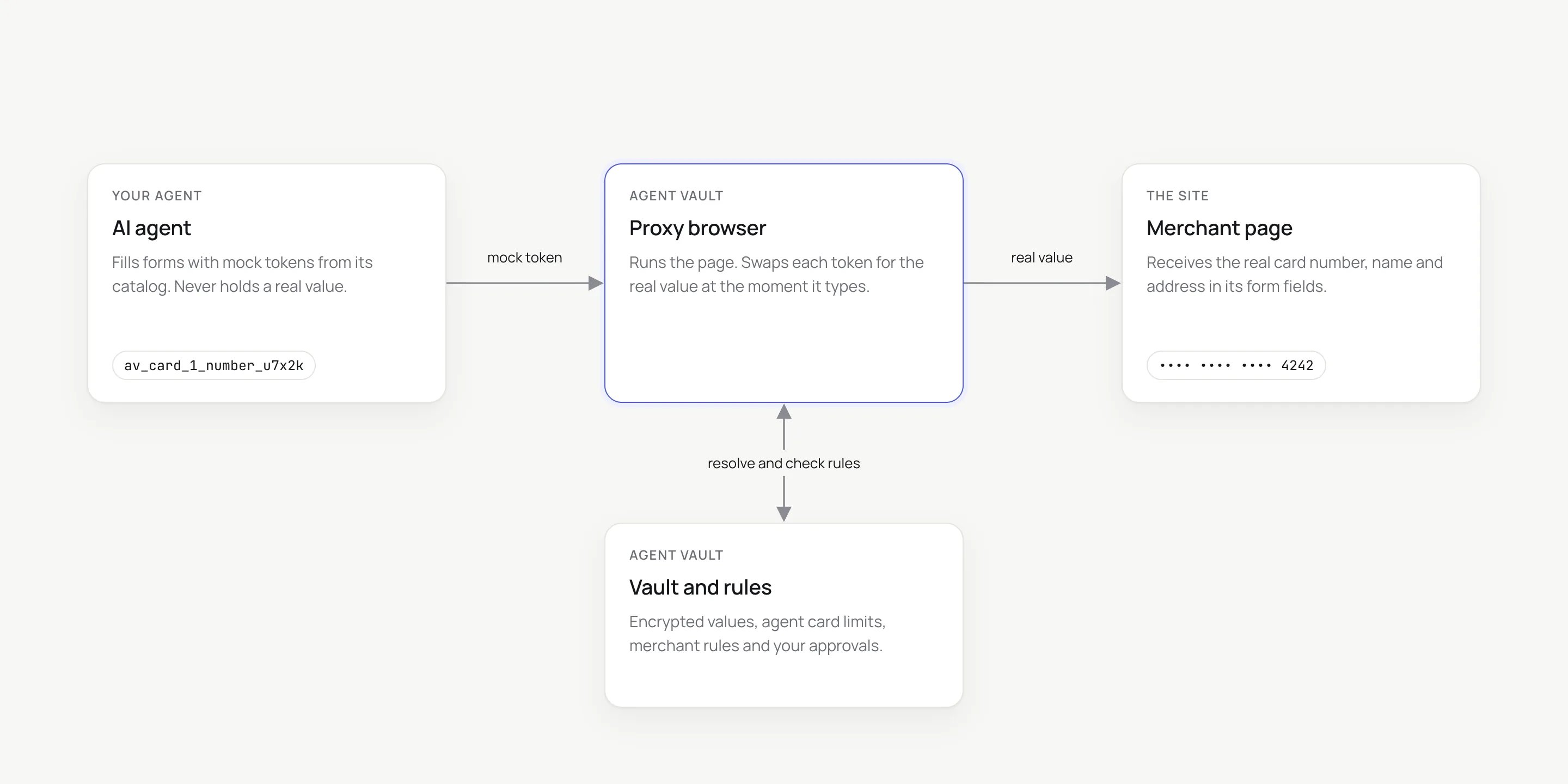
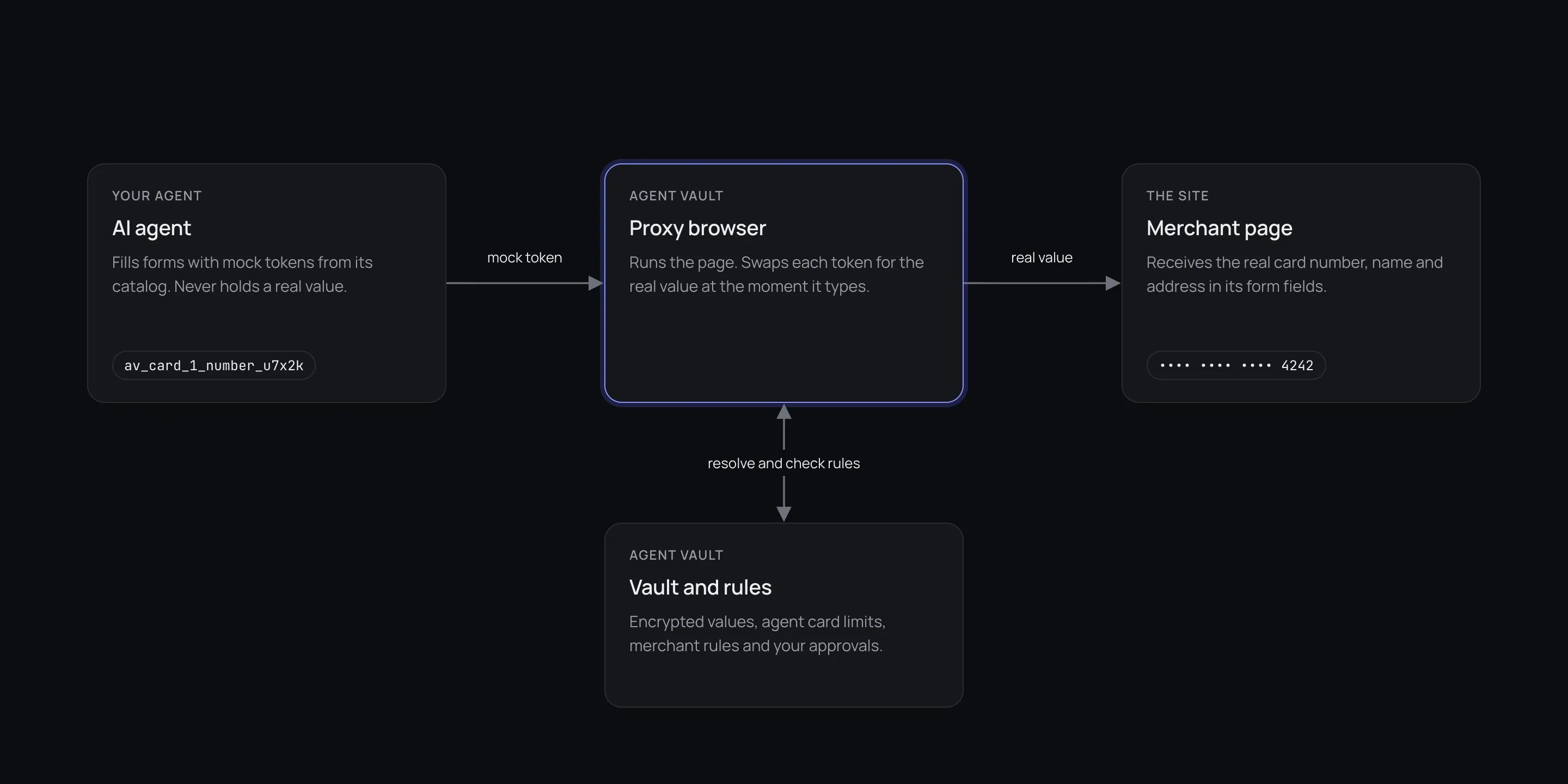
2. Your agent receives **mock tokens** instead, such as `av_card_1_number_u7x2k`.
They mean nothing anywhere else.
3. The agent drives a browser that runs inside the Agent Vault **proxy**, and
fills checkout and sign-in fields with tokens.
4. At each fill, the proxy checks your rules, swaps the token for the real
value, and types it into the merchant's page. The merchant gets the real
value. The agent never does.
 A stolen token only works inside the proxy, for the account that owns it. A
login fills only on its registered site, your other details only on a site you
authorized, and a card only within its agent card's limits. A card with no agent card has
no spending caps or merchant rules, only your plan's payment quota.
[How it works](/get-started/how-it-works) follows one checkout step by step, and
the [Security model](/security/model) sets out what an attacker gets.
## Who it is for
You want an agent to buy things or sign in for you, and you want to decide
how much it spends, where, and when it asks you first.
You are building an agent that pays or signs in, and you want no card
numbers or passwords in its prompts, logs or tool output.
## Safer than giving each agent its own card
A virtual card per agent caps spending, but the agent still holds a working card
number. Anyone who gets that number out of the agent's context can use it.
| | Virtual card per agent | Agent Vault |
| - | - | - |
| The agent holds | A working card number | A token that is useless outside the proxy |
| If the context leaks | The number works elsewhere | The token is a meaningless string |
| Limits apply | When the issuer authorizes the charge | Before the number is typed into the page |
| Card charged | A separate card issued for the agent | The card you already have |
| Passwords | Not covered | Covered by the same token model |
## What you control
Caps per transaction, per day, per week and per rolling 30 days.
Block specific sites, or on Enterprise, allow only the sites you name.
Above an amount you choose, the checkout waits for your yes.
Bank checks, one-time codes and CAPTCHAs come to you on the live page.
Stop every agent in one click.
Sessions, fields filled by kind, and refusals with their reasons, recorded
on a best-effort basis.
An **agent card** holds these rules on top of your own card. It has no card
number of its own. See [Agent cards](/dashboard/agent-cards).
## What Agent Vault is not
| It is not | Because |
| - | - |
| A payment processor | It moves no money. The merchant and your card issuer hold the financial record |
| A way around bot detection | CAPTCHAs, 3-D Secure and one-time codes are handed to you, never solved |
| An everyday password manager | It stores logins for agents, and most stored values are never shown back to you |
| A way to hide your card from the merchant | The merchant receives your real card. Agent Vault keeps it from the agent |
## Who makes Agent Vault
Agent Vault is a product of SocialConnect Labs, Inc., doing business as Self
Labs, the company behind [Self](https://self.xyz). The company publishes its
[Terms of Service](https://self.xyz/terms) and
[Privacy Notice](https://self.xyz/privacy) on self.xyz. Questions about either,
or about Agent Vault's own terms, go to [team@self.xyz](mailto:team@self.xyz).
## Next steps
From sign-up to your agent's first checkout, in about 15 minutes.
The terms the rest of the docs use.
MCP server, Playwright SDK, or the agent skill.
Short answers to the questions new users ask first.
This documentation is built and hosted on [Mintlify](https://mintlify.com), a developer documentation platform.
A stolen token only works inside the proxy, for the account that owns it. A
login fills only on its registered site, your other details only on a site you
authorized, and a card only within its agent card's limits. A card with no agent card has
no spending caps or merchant rules, only your plan's payment quota.
[How it works](/get-started/how-it-works) follows one checkout step by step, and
the [Security model](/security/model) sets out what an attacker gets.
## Who it is for
You want an agent to buy things or sign in for you, and you want to decide
how much it spends, where, and when it asks you first.
You are building an agent that pays or signs in, and you want no card
numbers or passwords in its prompts, logs or tool output.
## Safer than giving each agent its own card
A virtual card per agent caps spending, but the agent still holds a working card
number. Anyone who gets that number out of the agent's context can use it.
| | Virtual card per agent | Agent Vault |
| - | - | - |
| The agent holds | A working card number | A token that is useless outside the proxy |
| If the context leaks | The number works elsewhere | The token is a meaningless string |
| Limits apply | When the issuer authorizes the charge | Before the number is typed into the page |
| Card charged | A separate card issued for the agent | The card you already have |
| Passwords | Not covered | Covered by the same token model |
## What you control
Caps per transaction, per day, per week and per rolling 30 days.
Block specific sites, or on Enterprise, allow only the sites you name.
Above an amount you choose, the checkout waits for your yes.
Bank checks, one-time codes and CAPTCHAs come to you on the live page.
Stop every agent in one click.
Sessions, fields filled by kind, and refusals with their reasons, recorded
on a best-effort basis.
An **agent card** holds these rules on top of your own card. It has no card
number of its own. See [Agent cards](/dashboard/agent-cards).
## What Agent Vault is not
| It is not | Because |
| - | - |
| A payment processor | It moves no money. The merchant and your card issuer hold the financial record |
| A way around bot detection | CAPTCHAs, 3-D Secure and one-time codes are handed to you, never solved |
| An everyday password manager | It stores logins for agents, and most stored values are never shown back to you |
| A way to hide your card from the merchant | The merchant receives your real card. Agent Vault keeps it from the agent |
## Who makes Agent Vault
Agent Vault is a product of SocialConnect Labs, Inc., doing business as Self
Labs, the company behind [Self](https://self.xyz). The company publishes its
[Terms of Service](https://self.xyz/terms) and
[Privacy Notice](https://self.xyz/privacy) on self.xyz. Questions about either,
or about Agent Vault's own terms, go to [team@self.xyz](mailto:team@self.xyz).
## Next steps
From sign-up to your agent's first checkout, in about 15 minutes.
The terms the rest of the docs use.
MCP server, Playwright SDK, or the agent skill.
Short answers to the questions new users ask first.
This documentation is built and hosted on [Mintlify](https://mintlify.com), a developer documentation platform. Meta Muse
 Grok Bot
 OpenClaw
 Claude Code
 Hermes
 Antigravity
 Codex
Codex