

checkout_total_unknown goes through. The same call stores a site’s authenticator secret without the agent seeing it. Each takes about 5 minutes to add.
Before a card fill, the vault reads the total off the page to check the account holder’s limits. It looks for names like order-summary, total or cart-total. On a shop that names things differently, it finds nothing:
- A card with spending limits is refused with
checkout_total_unknown. - A card with a
confirmAbovethreshold asks the account holder to approve an amount nobody can read.
Before you start
- A proxy session on the checkout page, before your first token fill if you can.
- For a 2FA secret: the login’s label from the token catalog, and the site’s setup page open.
Point at the total
1
Declare the hint when you reach the checkout page
declare_page_hint takes the same fields flat. Declare before the first token fill (see what changes after the first fill).2
Check that it resolved
resolved: true with an amount means a usable figure. untrusted says why a figure was refused. If resolved is false, point somewhere else before you fill. accepted: false means the hint was dropped, so declare it again. With checked: false there is no resolved to read: see below.3
Declare again after every navigation
A hint describes the page you declared it on. A new page or a route change needs a new hint.
4
Fill the card
Continue with the card fill order. The vault uses your hint at fill time.
What changes after the first fill
Once any token is filled in the session, the rules tighten. Selectors that compare an attribute value (inselector or frame) are no longer allowed:
- Declared after the fill, such a hint is refused with
invalid_hintand nothing is recorded. You never get{ accepted: true }for it. - Declared before the fill, such a hint stays on record, but the vault skips it when it reads the total at the card fill. It does not help the fill.
[data-total]) is still accepted after a fill. The reply is { accepted: true, checked: false } with no amount. checked: false is not a rejection: the hint is kept and used at the card fill.
Totals inside an iframe
Overlay checkouts (Paddle, Lemon Squeezy, embedded Stripe) show the total in a child frame the vault never reads. Name the frame:frame, the vault reads the frame’s whole text along with the element you name, so a larger figure beside it cannot hide. That read has a ceiling:
- A frame holding more than 20,000 characters of text is too big. The hint is dropped.
- The vault parses at most 16,384 characters for one look at a checkout: the page’s own text plus the hint’s text, the frame’s whole text included. A hint that would take it past that is dropped too.
- The vault also reads every other frame on the page, so a cheaper frame cannot stand in for the real one. With more than 32 frames, a frame that does not answer, any frame over 20,000 characters, or more than 24,000 characters across them, the total is unknown.
accepted: false, even though your selector matched, and declaring it again gives the same answer. After a token fill the reply is still { accepted: true, checked: false }, but the hint is dropped when the card fill reads the total. Either way the total stays unknown. Point at a total outside the frame (a hint without frame) if the page shows one. Otherwise a card with an approval threshold asks the account holder to approve the purchase, and a card with spending limits is refused with checkout_total_unknown.
Reading an attribute
aria-label="Total: $49.99" resolves, content="49.99" does not. Without frame, the page must also show some amount as text, or the hint is dropped.
A selector should name the total, not a region. An order.total hint that matches more than 8 elements, or an element whose text or attribute is over 4,000 characters, adds nothing and answers accepted: false.
Selectors are plain CSS only. Playwright extensions (text=, :has-text(), >>, XPath) are refused with invalid_hint. A selector or frame may be at most 512 characters, counted after surrounding spaces are trimmed. A longer one is refused with invalid_hint and nothing is recorded. List current hint kinds with page.hintKinds() (MCP: list_page_hint_kinds).
A page holds at most 4 hints of each kind. A fifth distinct hint of the same kind on that page is refused with invalid_hint. These do not use a place:
- Declaring the same hint again, with the same kind,
selector,frame,readandattribute. - A malformed hint, which is refused before anything is recorded.
- A hint that was dropped (
accepted: false), or a 2FA secret attempt that failed withhint_unresolved.
Storing a 2FA secret
When the agent turns on authenticator two-factor for a site, it points at theotpauth:// link the site shows, and the vault stores the secret.
1
Sign in as that login in this session
Fill the login’s password (or its current code) first. Filling only its username does not count.
2
Reveal the setup key as a link
Use the site’s “can’t scan the QR code?” option so the
otpauth:// link is visible on the page.3
Point at the link
4
Finish the setup on the site
Fetch the catalog again, and fill the login’s new
totp token into the site’s verify field.- The page is served over
https://(orhttp://on a loopback address, for a local demo). Otherwise you getinsecure_page. - This session has already filled a token. Otherwise you get
sensitive_data_blocked. - This session signed in as that login: its password (or two-factor code) token landed in a field. Otherwise you get
sensitive_data_blocked.
hint_unresolved, without saying which failed:
- The account holder has only one login for this site, and it has no two-factor yet.
- The
otpauth://link names an account matching the stored username exactly.adadoes not matchada@example.com. - Exactly one element matches, visible, on the top-level page. It is a link read through
href, not a QR image or<canvas>. - The page stays on the same site, still on
https://(or loopbackhttp://), while the vault reads it.
What the account holder sees
When the total cannot be read on a card with an approval threshold, they get a purchase approval with no amount, and a denial is reasonable. A hint that resolves the total removes that prompt when the amount is under the threshold.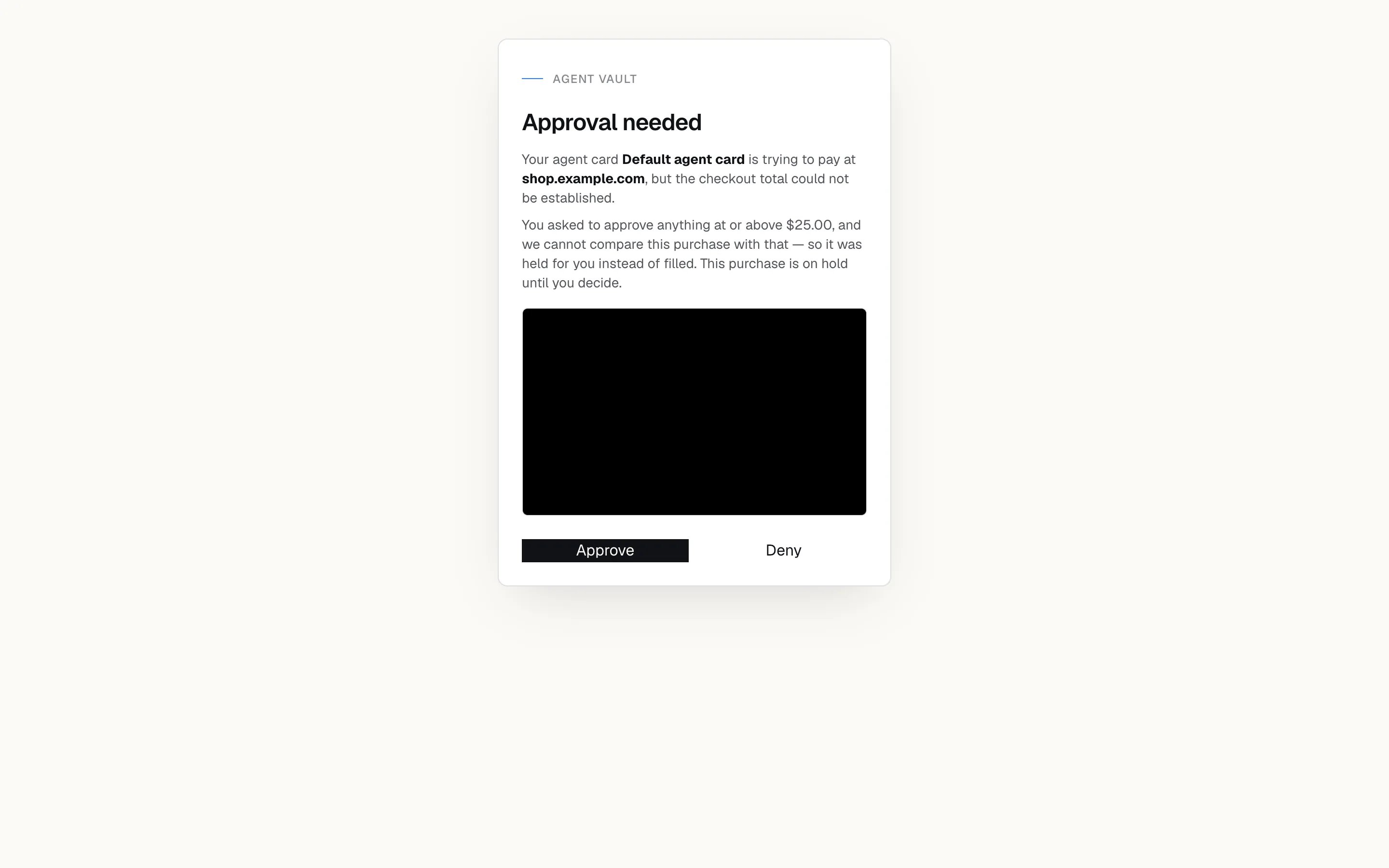
A purchase approval for a total that could not be read.
totp_enrolled notification. It is best effort: the secret stays stored even if the notification fails, so the login’s 2FA chip on Logins is the reliable record.


The notification an account holder gets when an agent enrolls a secret.
If something goes wrong
Full codes: Error codes.
Next: Run a checkout end to end to see where a hint fits in the full checkout.